- 간단해진 CCRC WAN Server Version 8 구조
- 버전8로 오면서 CCRC WAN Server의 성능과 확장성이 배가되었습니다.
- UCM/CQ 통합시 OSLC(HTTP연결)를 사용하며 CQIntSrv를 사용하지 않음
- Base CC/CQ 통합시에는 기존의 방식을 사용함

- CQ CM Server (7.x와 동일)
- -
- -

2012년 1월 2일 월요일
CCCQ8 CM Architecture Change


2011년 12월 30일 금요일
CQ OSLC CM 2.0 REST API
https://jazz.net/wiki/bin/view/Main/CqOslcV2
OSLC 란?
OSLC는 소프트웨어 딜러버리 라이프싸이클 관련 리소스 및 인터페이스 표준화 관련 커뮤니티입니다. 이를 통해 ALM 도구 간의 통합을 지원합니다. 다른 한편으로 CQ 같은 하나의 도구의 리소스를 작업하기 위한 API로 사용할 수 있습니다.
더 자세한 정보는 http://open-services.net/.
REST 란?
REST는 아키텍처 스타일로서
CQ REST API 버전들
OSLC 2.0 API를 사용할 때는 HTTP 요청 전 요청 헤더 OSLC-Core-Version의 값을 2.0으로 설정합니다.
OSLC-Core-Version: 2.0
이 헤더를 설정하지 않으면 하위 호환성을 위해 OSLC-CM 1.0 응답을 제공합니다.
CQ OSLC 1.0과 CQ OSLC 2.0의 차이점
리소스의 표현
CQ는 모든 리소스에 대한 RDF/XML (application/rdf+xml) 표현, JSON (application/json) 표현을 제공합니다. 쿼리인 경우, Atom (application/atom+xml) 표현도 지원하고, 레코드인 경우, HTML (text/html) 표현을 제공합니다. 콘텐츠 유형은 HTTP Accept 요청 헤더를 통해 표시합니다 (RFC 2616 참조). 예를 들면 RDF/XML 콘텐츠 유형을 요청할 경우, 아래 요청 헤더를 사용합니다. (Accept 헤더를 설정하지 않은 경우에 디폴트로 아래 값을 사용합니다.)
Accept: application/rdf+xml
아래처럼 하나 이상의 콘텐츠 유형을 요청할 수 있습니다.
Accept: text/html,application/atom+xml
아래처럼 rcm.contentType 패러미터를 이용해 콘텐츠를 요청할 수 있습니다. 이 경우에는 HTTP Accept 헤더에 설정 값을 무시합니다.
GET http://quagmire.rtp.raleigh.ibm.com/cqweb/oslc/?rcm.contentType=application/json
RDF/XML를 사용할 때는 사용 편의성 및 에러방지를 위해 RDF/XML 파싱시, Jena 같은 자바 라이브러리를 사용하길 권장합니다.
인증
CQ OSLC-CM REST API는 사용자 인증을 위해 Basic Access Authentication과 OAuth를 지원합니다. 리소스에 엑세스할 경우에는 인증에 대한 준비를 해야 합니다. 다만 Base URI에 GET 요청을 하고 스키마 저장소 목록을 가져올 경우에는 인증이 필요하지 않습니다. 인증이 필요할 경우에는 401 HTTP 상태 코드를 수반합니다.
Basic access authentication과 OAuth 중 어느 것을 사용할지?
대부분의 경우 Basic access authentication를 사용할 수 있습니다. 간단하며 셋업이 필요하지 않습니다. 다만 SSL을 사용하지 않는 경우 보안이 약합니다. 그리고 RFC2617에서 정의한바 비(非) ASCII 사용자 ID를 지원하지 않습니다.
OAuth는 관리자 셋업을 필요로 하지만 여러 장점이 있습니다. 사용자 ID와 암호가 필요하지 않는 까닭에 보다 안전합니다. 대신 CQ가 발행하는 엑세스 토큰으로 인증을 합니다. 엑세스 토큰은 서버 재시작 전까지 유효하며 한명의 사용자만 사용할 수 있습니다. 그렇더라도 SSL을 사용하는 것을 권장합니다.
Basic Access Authentication
Basic access authentication을 사용할때는 사용자 ID와 암호를 Base64 인코딩으로 HTTP 인증 요청 헤더에 명시합니다. SSL을 사용하지 않을 경우 보안에 약합니다.
거의 모든 브라우저에서 Basic access authentication을 지원합니다. CQ OSLC URI를 브라우저에서 탐색을 하게되면, 기존의 활성 세션이 없는 경우에는 사용자의 ID와 암호를 묻게 됩니다.
대부분의 HTTP 클라이언트 라이브러리 또한 Basic access authentication을 지원합니다. 아래 예는 Apache HTTP 클라이언트 사용하여 사용자 ID와 암호를 명시하는 경우입니다.
요청:
DELETE /cqweb/oslc/session/ HTTP/1.1
서비스 열람
서비스 열람은 OSLC 제공자가 제공하는 기능을 열람하도록 합니다. 그래서 OSLC 제공자와의 작업의 출발점이 됩니다. CQ는 OSLC Core 2.0 스펙을 따른 모델을 제공합니다. 먼저 Base URI에 GET 메쏘드를 호출하여 서비스 제공자 카탈로그를 획득합니다. 카탈로그와 다른 리소스와의 관계는 아래 그림을 참고하세요.

-
서비스 제공자 카탈로그
CQ가 제공하는 최상위 카탈로그는 서버에 정의된 데이터베이스 세트들입니다. 각 데이터베이스 세트는 각각의 사용자를 가지는 까닭에 개별적인 OAuth 구성정보를 가집니다. 각 데이터베이스 세트별로 개별 사용자 데이터베이스 카탈로그 위치를 가지고 있습니다.
아래는 CQ 서비스 제공자 카탈로그 리소스의 RDF/XML 표현 예로써 두개의 데이터베이스 세트: DOC, Links를 나타냅니다.
요청:
응답:
아래는 CQ 서비스 제공자 카탈로그 리소스의 JSON 표현 예로써 두개의 데이터베이스 세트: DOC, Links를 나타냅니다.
요청:
응답: 생략
서비스 기술 문서
각각의 CQ 사용자 데이터베이스는 개별의 서비스 기술 문서를 가지고 있습니다. 이 서비스 기술 문서에는 새로운 레코드 생성과 쿼리를 위한 URL이 정의되어 있고 다른 웹 애플리케이션에서 사용할 수 있는 레코드 선택 및 생성에 필요한 대화상자에 대해 기술하고 있습니다. 각각의 레코드 유형별로 레코드 선택 및 생성 대화상자와 쿼리에 대한 서비스를 제공함을 유의하시기 바랍니다. 또한 디폴트로 제공하는 레코드 선택 대화상자는 레코드 유형을 선택할 수 있는 기능을 제공합니다.
아래는 DefectTracking 스키마의 SAMPL 사용자 데이터베이스가 제공하는 CQ 서비스 기술 문서 리소스에 대한 RDF/XML 표현의 예입니다.
요청:
응답:
리소스 형태
CQ는 레코드를 충분히 커스텀할 수 있는 기능을 제공합니다. 새로운 레코드 타입을 정의하고 각 레코드 타입에 들어갈 필드를 선택할 수 있습니다. 그렇다면 특정 CQ 사용자 데이터베이스에 있는 특정 레코드 타입에 정의된 필드는 어떻게 알 수 있을까요?
이를 돕기 위해 OSLC 리소스 형태를 제공합니다. 리소스 형태는 각 필드의 타입 뿐만 아니라 레코드에 정의된 필드들에 대한 정보를 알려줍니다. 또한 어떤 필드가 필수 요소이며 어떤 값이 유효한지 알수 있습니다. OSLC Core 2.0 스펙: 부록 A에 정의된 oslc:ResourceShape Resource 를 참고하시기 바랍니다.
레코드 타입 형태
레코드 타입에 대한 형태는 여러 곳에서 파악할 수 있습니다. 예를 들면,
쿼리 결과 형태
요청:
OSLC-CM 2.0 ChangeRequest 리소스에 대한 지원
OSLC 2.0 Change Management 스펙은 ChangeRequest 리소스에 대해 정의하고 있습니다. 이 리소스는 OSLC 제공자가 공통으로 갖는 프로퍼티들을 갖고 있습니다. CQ 또한 이러한 프로퍼티 대부분을 지원합니다.
모든 레코드에 공통인 표준 프로퍼티들
아래 표준 ChangeRequest 프로퍼티들은 모든 유형의 레코드에서 제공합니다.
추가로 상태를 갖는 레코드에는 다음 프로퍼티를 제공합니다.
OSLCLinks 패키지에서 제공하는 표준 프로퍼티들
레코드 타입에 OSLCLinks 패키지를 적용한 경우 추가적으로 제공하는 OSLC ChangeRequest 프로퍼티들이 있습니다.
OSLCLinks 1.0
OSLCLinks 1.0 패키지는 여느 레코드와의 링크를 허용합니다. OSLC-CM 2.0에서 정의한 모든 링크 타입이 지원됩니다.
OSLCLinks 1.1
OSLCLinks 1.1 패키지는 상태 값 프로퍼티를 제공합니다.
스키마에서 정의된 워크플로우에 맞게 상태 값을 설정하기 위해서는 훅(Hook)이 필요합니다. OSLCLinks 패키지 관련 문서를 참고하세요.
그 밖의 표준 프로퍼티들
ALM 스키마를 사용한 경우 OOTB로 oslc:description, dcterms:creator, dcterms:contributor 등의 OSLC ChangeRequest 프로퍼티들을 제공합니다. 레코드에서 사용할 수 있는 OSLC 프로퍼티들을 파악하기 위해서는 레코드에 대한 oslc:instanceShape를 요청해서 알아볼 수 있습니다.
OSLC 란?
OSLC는 소프트웨어 딜러버리 라이프싸이클 관련 리소스 및 인터페이스 표준화 관련 커뮤니티입니다. 이를 통해 ALM 도구 간의 통합을 지원합니다. 다른 한편으로 CQ 같은 하나의 도구의 리소스를 작업하기 위한 API로 사용할 수 있습니다.
더 자세한 정보는 http://open-services.net/.
REST 란?
REST는 아키텍처 스타일로서
- 리소스는 URI를 가집니다.
- 리소스는 다양한 표현을 가집니다.
- 리소스는 이러한 표현을 통해 변경할 수 있습니다.
- GET 메쏘드는 리소스를 가져옵니다.
- PUT 메쏘드는 리소스를 갱신합니다.
- POST 메쏘드는 새로운 리소스를 생성합니다.
- DELETE 메쏘드는 리소스를 삭제합니다.
CQ REST API 버전들
- CQ 7.1.0.0 웹에서 REST API를 처음 지원합니다.
- RTC 2.0과 CQ 7.1.1.0에서 OSLC-CM 1.0 REST API를 지원합니다.
- CQ 7.1.2.1에서 여기 소개된 OSLC-CM 2.0을 지원합니다.
OSLC 2.0 API를 사용할 때는 HTTP 요청 전 요청 헤더 OSLC-Core-Version의 값을 2.0으로 설정합니다.
OSLC-Core-Version: 2.0
이 헤더를 설정하지 않으면 하위 호환성을 위해 OSLC-CM 1.0 응답을 제공합니다.
- CQ OSLC 2.0의 XML 응답은 RDF/XML 표현입니다. Resource Representations 참고하세요.
- CQ OSLC 2.0의 RDF/XML와 JSON 응답은 표준 OSLC ChangeRequest 프로퍼티와 CQ 필드 값을 함께 제공합니다.
- PUT 요청시, oslc.properties 패리미터를 설정하지 않을 경우에는, 모든 필드 값을 제공해야 합니다. Working with Records: PUT 참고하세요.
- CQ OSLC 2.0에서는 각 레코드 유형별 쿼리 URL을 제공합니다.
- 네임스페이스 및 패러미터 이름은 OSLC-CM 2.0 Specification를 참고하세요.
리소스의 표현
CQ는 모든 리소스에 대한 RDF/XML (application/rdf+xml) 표현, JSON (application/json) 표현을 제공합니다. 쿼리인 경우, Atom (application/atom+xml) 표현도 지원하고, 레코드인 경우, HTML (text/html) 표현을 제공합니다. 콘텐츠 유형은 HTTP Accept 요청 헤더를 통해 표시합니다 (RFC 2616 참조). 예를 들면 RDF/XML 콘텐츠 유형을 요청할 경우, 아래 요청 헤더를 사용합니다. (Accept 헤더를 설정하지 않은 경우에 디폴트로 아래 값을 사용합니다.)
Accept: application/rdf+xml
아래처럼 하나 이상의 콘텐츠 유형을 요청할 수 있습니다.
Accept: text/html,application/atom+xml
아래처럼 rcm.contentType 패러미터를 이용해 콘텐츠를 요청할 수 있습니다. 이 경우에는 HTTP Accept 헤더에 설정 값을 무시합니다.
GET http://quagmire.rtp.raleigh.ibm.com/cqweb/oslc/?rcm.contentType=application/json
RDF/XML를 사용할 때는 사용 편의성 및 에러방지를 위해 RDF/XML 파싱시, Jena 같은 자바 라이브러리를 사용하길 권장합니다.
인증
CQ OSLC-CM REST API는 사용자 인증을 위해 Basic Access Authentication과 OAuth를 지원합니다. 리소스에 엑세스할 경우에는 인증에 대한 준비를 해야 합니다. 다만 Base URI에 GET 요청을 하고 스키마 저장소 목록을 가져올 경우에는 인증이 필요하지 않습니다. 인증이 필요할 경우에는 401 HTTP 상태 코드를 수반합니다.
Basic access authentication과 OAuth 중 어느 것을 사용할지?
대부분의 경우 Basic access authentication를 사용할 수 있습니다. 간단하며 셋업이 필요하지 않습니다. 다만 SSL을 사용하지 않는 경우 보안이 약합니다. 그리고 RFC2617에서 정의한바 비(非) ASCII 사용자 ID를 지원하지 않습니다.
OAuth는 관리자 셋업을 필요로 하지만 여러 장점이 있습니다. 사용자 ID와 암호가 필요하지 않는 까닭에 보다 안전합니다. 대신 CQ가 발행하는 엑세스 토큰으로 인증을 합니다. 엑세스 토큰은 서버 재시작 전까지 유효하며 한명의 사용자만 사용할 수 있습니다. 그렇더라도 SSL을 사용하는 것을 권장합니다.
Basic Access Authentication
Basic access authentication을 사용할때는 사용자 ID와 암호를 Base64 인코딩으로 HTTP 인증 요청 헤더에 명시합니다. SSL을 사용하지 않을 경우 보안에 약합니다.
거의 모든 브라우저에서 Basic access authentication을 지원합니다. CQ OSLC URI를 브라우저에서 탐색을 하게되면, 기존의 활성 세션이 없는 경우에는 사용자의 ID와 암호를 묻게 됩니다.
대부분의 HTTP 클라이언트 라이브러리 또한 Basic access authentication을 지원합니다. 아래 예는 Apache HTTP 클라이언트 사용하여 사용자 ID와 암호를 명시하는 경우입니다.
HttpClient http = new HttpClient();
Credentials credential
= new UsernamePasswordCredentials("user", "password");
http.getParams().setAuthenticationPreemptive(true);
http.getState().setCredentials(AuthScope.ANY, credential);
각 HTTP 클라이언트 라이브러리 문서를 참고하시기 바랍니다.
각 HTTP 클라이언트 라이브러리 문서를 참고하시기 바랍니다.
OAuth
시작하기 전에 먼저 OAuth 개념을 이해바랍니다. The Beginner's Guide to OAuth는 훌륭한 자료입니다.
OAuth 라이브러리
OAuth 인증을 사용할 때는 OAuth 라이브러리를 사용하여 요청에 사인을 합니다. 각각의 프로그래밍 언어별 오픈소스 라이브러리는 http://oauth.net/code/에서 찾을 수 있습니다.
OAuth 이용자 등록
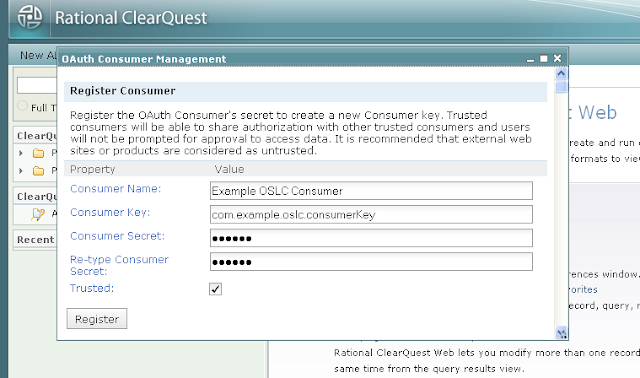
OAuth 인증을 사용하기 위해서는 사용하는 애플리케이션을 OAuth 이용자로 등록해야 합니다. 우선 CQ 웹을 어드민으로 로그인을 하고, "Site Administration" 메뉴에서 "OAuth Consumer Management"를 선택합니다. 설정 대화 상자가 나타나면 아래 나와있는 OAuth 이용자 정보를 입력합니다.
CQ는 RootServicesSpecAddendum2에 기술된 째즈의 동적 OAuth 이용자 등록 방법 또한 지원합니다. CQ의 루트 서비스 URI는 Base URI에 기술되어 있습니다.
OAuth 토큰 획득하기
OAuth 엑세스 토큰을 획득하는 절차는 아래와 같습니다.
OAuth 엑세스 토큰은 사용자 대신하여 요청을 할 수 있도록 해주며, CQ 서버가 재시작될때까지 유효합니다.
요청 사인하기
엑세스 토큰으로 요청을 사인할려면 OAuth 라이브러리가 필요합니다. CQ는, OAuth의 제공자로써, HMAC-SHA1 사인 메쏘드를 지원하며, Authorization 헤더, 쿼리 문자열의 일부 및 요청 바디 상의 OAuth 패러미터를 허용합니다. OAuth 1.0a: Parameter Transmission를 참고하세요.
세션 관리
CQ 세션은 클라이언트가 보호된 리소스를 접근할 때 체결되며 비활성 상태로 일정 기간이 지나면 만료됩니다. 만료는 HTTP 세션 타임아웃 또는 CQ 세션 타임아웃시 발생합니다. 일반적으로 세션이 체결될때 라이센스를 가져오며 세션이 만료될 때 라이센스가 릴리즈됩니다.
HTTP 클라이언트로 Base URI 아래 /session/ 컨텍스트에 DELETE 메쏘드를 호출함으로써 명시적으로 CQ 세션을 무효화할 수 있습니다.
시작하기 전에 먼저 OAuth 개념을 이해바랍니다. The Beginner's Guide to OAuth는 훌륭한 자료입니다.
OAuth 라이브러리
OAuth 인증을 사용할 때는 OAuth 라이브러리를 사용하여 요청에 사인을 합니다. 각각의 프로그래밍 언어별 오픈소스 라이브러리는 http://oauth.net/code/에서 찾을 수 있습니다.
OAuth 이용자 등록
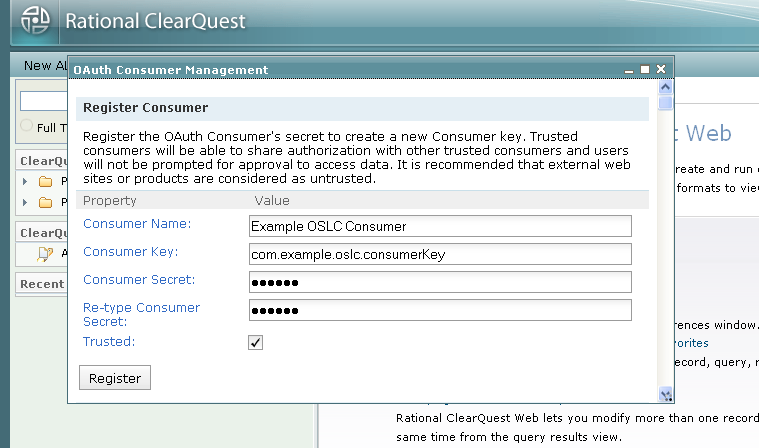
OAuth 인증을 사용하기 위해서는 사용하는 애플리케이션을 OAuth 이용자로 등록해야 합니다. 우선 CQ 웹을 어드민으로 로그인을 하고, "Site Administration" 메뉴에서 "OAuth Consumer Management"를 선택합니다. 설정 대화 상자가 나타나면 아래 나와있는 OAuth 이용자 정보를 입력합니다.
| 프로퍼티 | 설명 |
|---|---|
| 이용자 이름 | 애플리케이션 이름, 사용자에게 표시됩니다. |
| 이용자 키 | 값을 지정하며 되며 유일해야 합니다. |
| 이용자 암호 | CQ와 애플리케이션간에 공유되는 암호입니다. CQ는 이 암호를 통해서 애플리케이션 요청을 검증합니다. 특정 값을 암호로 지정합니다. |
| 신뢰됨 | 선택을 할 경우, CQ는 신뢰하는 다른 애플리케이션과 인증을 공유할 수 있습니다. |
CQ는 RootServicesSpecAddendum2에 기술된 째즈의 동적 OAuth 이용자 등록 방법 또한 지원합니다. CQ의 루트 서비스 URI는 Base URI에 기술되어 있습니다.
OAuth 토큰 획득하기
OAuth 엑세스 토큰을 획득하는 절차는 아래와 같습니다.
- oslc:oauthRequestTokenURI로 OAuth 요청 토큰을 요청합니다.
- oslc:authorizationURI로 사용자 인증 처리를 리다이렉트합니다.
- oslc:oauthAccessTokenURI로 OAuth 요청 토큰을 OAuth 엑세스 토큰으로 교환합니다.
OAuth 엑세스 토큰은 사용자 대신하여 요청을 할 수 있도록 해주며, CQ 서버가 재시작될때까지 유효합니다.
요청 사인하기
엑세스 토큰으로 요청을 사인할려면 OAuth 라이브러리가 필요합니다. CQ는, OAuth의 제공자로써, HMAC-SHA1 사인 메쏘드를 지원하며, Authorization 헤더, 쿼리 문자열의 일부 및 요청 바디 상의 OAuth 패러미터를 허용합니다. OAuth 1.0a: Parameter Transmission를 참고하세요.
세션 관리
CQ 세션은 클라이언트가 보호된 리소스를 접근할 때 체결되며 비활성 상태로 일정 기간이 지나면 만료됩니다. 만료는 HTTP 세션 타임아웃 또는 CQ 세션 타임아웃시 발생합니다. 일반적으로 세션이 체결될때 라이센스를 가져오며 세션이 만료될 때 라이센스가 릴리즈됩니다.
HTTP 클라이언트로 Base URI 아래 /session/ 컨텍스트에 DELETE 메쏘드를 호출함으로써 명시적으로 CQ 세션을 무효화할 수 있습니다.
요청:
DELETE /cqweb/oslc/session/ HTTP/1.1
Host: quagmire.rtp.raleigh.ibm.com
OSLC-Core-Version: 2.0
응담:
HTTP/1.1 204 No Content
응담:
HTTP/1.1 204 No Content
Content-Length: 0
결과로 세션과 관련된 라이센스는 릴리스됩니다.
세션을 추적하기 위해서는 HTTP 클라이언트 사용시 쿠키를 사용 가능하도록 해야 합니다. Apache HTTP 클라이언트를 사용할 경우, http.protocol.single-cookie-header를 true로 설정할 수 있습니다.
HttpClient http = new HttpClient();
결과로 세션과 관련된 라이센스는 릴리스됩니다.
세션을 추적하기 위해서는 HTTP 클라이언트 사용시 쿠키를 사용 가능하도록 해야 합니다. Apache HTTP 클라이언트를 사용할 경우, http.protocol.single-cookie-header를 true로 설정할 수 있습니다.
HttpClient http = new HttpClient();
http.getParams().setParameter("http.protocol.single-cookie-header", true);
http.getParams().setCookiePolicy(CookiePolicy.BROWSER_COMPATIBILITY)
Base URI
OSLC-CM 2.0 엑세스를 위한 Base URI는 아래와 같습니다.
http:///cqweb/oslc/
통합를 위한 CQ 루트 서비스 URI는 아애와 같습니다.
http:///cqweb/oslc/repo//discovery
만약 데이터베이스 세트 이름에 비 ASCII 문자가 있다면 인코딩이 필요함을 주의하시기 바랍니다.
본 자료는 RootServicesSpec을 준수하며 째즈 제품과의 통합을 위해 많이 사용합니다.
Base URI
OSLC-CM 2.0 엑세스를 위한 Base URI는 아래와 같습니다.
http://
통합를 위한 CQ 루트 서비스 URI는 아애와 같습니다.
http://
만약 데이터베이스 세트 이름에 비 ASCII 문자가 있다면 인코딩이 필요함을 주의하시기 바랍니다.
본 자료는 RootServicesSpec을 준수하며 째즈 제품과의 통합을 위해 많이 사용합니다.
서비스 열람
서비스 열람은 OSLC 제공자가 제공하는 기능을 열람하도록 합니다. 그래서 OSLC 제공자와의 작업의 출발점이 됩니다. CQ는 OSLC Core 2.0 스펙을 따른 모델을 제공합니다. 먼저 Base URI에 GET 메쏘드를 호출하여 서비스 제공자 카탈로그를 획득합니다. 카탈로그와 다른 리소스와의 관계는 아래 그림을 참고하세요.

-
서비스 제공자 카탈로그
CQ가 제공하는 최상위 카탈로그는 서버에 정의된 데이터베이스 세트들입니다. 각 데이터베이스 세트는 각각의 사용자를 가지는 까닭에 개별적인 OAuth 구성정보를 가집니다. 각 데이터베이스 세트별로 개별 사용자 데이터베이스 카탈로그 위치를 가지고 있습니다.
아래는 CQ 서비스 제공자 카탈로그 리소스의 RDF/XML 표현 예로써 두개의 데이터베이스 세트: DOC, Links를 나타냅니다.
요청:
GET /cqweb/oslc/ HTTP/1.1
Host: quagmire.rtp.raleigh.ibm.com
OSLC-Core-Version: 2.0
Accept: application/rdf+xml
응답:
HTTP/1.1 200 OK
OSLC-Core-Version: 2.0
Transfer-Encoding: chunked
Content-Type: application/rdf+xml; charset=UTF-8

<?xml version="1.0" encoding="UTF-8"?>
<rdf:RDF xmlns="http://open-services.net/ns/core#" xmlns:dc="http://purl.org/dc/terms/" xmlns:rdf="http://www.w3.org/1999/02/22-rdf-syntax-ns#">
<ServiceProviderCatalog rdf:about="http://quagmire.rtp.raleigh.ibm.com/cqweb/oslc">
<dc:title>Repository</dc:title>
<dc:publisher>
<Publisher>
<dc:title>RCM/CQ OSLC CM Service Description Document</dc:title>
<label>RCM/CQ OSLC CM Service Description Document</label>
<dc:identifier>com.ibm.rational.cm.clearquest</dc:identifier>
<icon rdf:resource="http://quagmire.rtp.raleigh.ibm.com/cqweb/_rcm-resources/clearquest.ico"/>
</Publisher>
</dc:publisher>
<serviceProviderCatalog>
<ServiceProviderCatalog rdf:about="http://quagmire.rtp.raleigh.ibm.com/cqweb/oslc/repo/DOC">
<dc:title>DOC</dc:title>
<details rdf:resource="http://quagmire.rtp.raleigh.ibm.com/cqweb/"/>
<oauthConfiguration>
아래는 CQ 서비스 제공자 카탈로그 리소스의 JSON 표현 예로써 두개의 데이터베이스 세트: DOC, Links를 나타냅니다.
요청:
GET /cqweb/oslc/ HTTP/1.1
Host: quagmire.rtp.raleigh.ibm.com
OSLC-Core-Version: 2.0
Accept: application/json
응답: 생략
서비스 기술 문서
각각의 CQ 사용자 데이터베이스는 개별의 서비스 기술 문서를 가지고 있습니다. 이 서비스 기술 문서에는 새로운 레코드 생성과 쿼리를 위한 URL이 정의되어 있고 다른 웹 애플리케이션에서 사용할 수 있는 레코드 선택 및 생성에 필요한 대화상자에 대해 기술하고 있습니다. 각각의 레코드 유형별로 레코드 선택 및 생성 대화상자와 쿼리에 대한 서비스를 제공함을 유의하시기 바랍니다. 또한 디폴트로 제공하는 레코드 선택 대화상자는 레코드 유형을 선택할 수 있는 기능을 제공합니다.
아래는 DefectTracking 스키마의 SAMPL 사용자 데이터베이스가 제공하는 CQ 서비스 기술 문서 리소스에 대한 RDF/XML 표현의 예입니다.
요청:
GET /cqweb/oslc/repo/DOC/db/SAMPL/ HTTP/1.1
Host: quagmire.rtp.raleigh.ibm.com
OSLC-Core-Version: 2.0
Accept: application/rdf+xml
응답:
HTTP/1.1 200 OK
OSLC-Core-Version: 2.0
Transfer-Encoding: chunked
Content-Type: application/rdf+xml; charset=UTF-8

<?xml version="1.0" encoding="UTF-8"?>
<rdf:RDF xmlns="http://open-services.net/ns/core#" xmlns:dc="http://purl.org/dc/terms/" xmlns:cq="http://www.ibm.com/xmlns/prod/rational/clearquest/1.0/" xmlns:rdf="http://www.w3.org/1999/02/22-rdf-syntax-ns#">
<ServiceProvider rdf:about="http://quagmire.rtp.raleigh.ibm.com/cqweb/oslc/repo/DOC/db/SAMPL">
<dc:title>RCM/CQ OSLC CM Service Description Document</dc:title>
<dc:description>Rational Change Management/ClearQuest OSLC CM Services available for DOC/SAMPL.</dc:description>
<dc:publisher>
<Publisher>
<dc:title>IBM Rational ClearQuest</dc:title>
<label>IBM Rational ClearQuest</label>
<dc:identifier>com.ibm.rational.cm.clearquest</dc:identifier>
<icon rdf:resource="http://quagmire.rtp.raleigh.ibm.com/cqweb/_rcm-resources/clearquest.ico"/>
</Publisher>
</dc:publisher>
<details rdf:resource="http://quagmire.rtp.raleigh.ibm.com/cqweb/restapi/DOC/SAMPL?format=html"/>
<prefixDefinition>
<PrefixDefinition>
<prefix>oslc</prefix>
<prefixBase rdf:resource="http://open-services.net/ns/core#"/>
</PrefixDefinition>
</prefixDefinition>
<prefixDefinition>
<PrefixDefinition>
<prefix>oslc_cm</prefix>
<prefixBase rdf:resource="http://open-services.net/ns/cm#"/>
</PrefixDefinition>
</prefixDefinition>
<prefixDefinition>
<PrefixDefinition>
<prefix>dc</prefix>
<prefixBase rdf:resource="http://purl.org/dc/terms/"/>
</PrefixDefinition>
</prefixDefinition>
<prefixDefinition>
<PrefixDefinition>
<prefix>dcterms</prefix>
<prefixBase rdf:resource="http://purl.org/dc/terms/"/>
</PrefixDefinition>
</prefixDefinition>
<prefixDefinition>
<PrefixDefinition>
<prefix>rdf</prefix>
<prefixBase rdf:resource="http://www.w3.org/1999/02/22-rdf-syntax-ns#"/>
</PrefixDefinition>
</prefixDefinition>
<prefixDefinition>
<PrefixDefinition>
<prefix>rdfs</prefix>
<prefixBase rdf:resource="http://www.w3.org/2000/01/rdf-schema#"/>
</PrefixDefinition>
</prefixDefinition>
<prefixDefinition>
<PrefixDefinition>
<prefix>foaf</prefix>
<prefixBase rdf:resource="http://xmlns.com/foaf/0.1/"/>
</PrefixDefinition>
</prefixDefinition>
<prefixDefinition>
<PrefixDefinition>
<prefix>cq</prefix>
<prefixBase rdf:resource="http://www.ibm.com/xmlns/prod/rational/clearquest/1.0/"/>
</PrefixDefinition>
</prefixDefinition>
<prefixDefinition>
<PrefixDefinition>
<prefix>oslc_cmx</prefix>
<prefixBase rdf:resource="http://open-services.net/ns/cm-x#"/>
</PrefixDefinition>
</prefixDefinition>
<service>
<Service>
<domain rdf:resource="http://open-services.net/ns/cm#"/>
<creationFactory>
<CreationFactory>
<dc:title>Unattended location for the creation of ClearQuest Records</dc:title>
<label>Unattended location for the creation of ClearQuest Records</label>
<creation rdf:resource="http://quagmire.rtp.raleigh.ibm.com/cqweb/oslc/repo/DOC/db/SAMPL/record"/>
<resourceType rdf:resource="http://open-services.net/ns/cm#ChangeRequest"/>
<usage rdf:resource="http://open-services.net/ns/core#default"/>
<resourceShape rdf:resource="http://quagmire.rtp.raleigh.ibm.com/cqweb/oslc/repo/DOC/db/SAMPL/shape/16777224"/>
<resourceShape rdf:resource="http://quagmire.rtp.raleigh.ibm.com/cqweb/oslc/repo/DOC/db/SAMPL/shape/16777751"/>
<resourceShape rdf:resource="http://quagmire.rtp.raleigh.ibm.com/cqweb/oslc/repo/DOC/db/SAMPL/shape/16777220"/>
<resourceShape rdf:resource="http://quagmire.rtp.raleigh.ibm.com/cqweb/oslc/repo/DOC/db/SAMPL/shape/16777222"/>
<resourceShape rdf:resource="http://quagmire.rtp.raleigh.ibm.com/cqweb/oslc/repo/DOC/db/SAMPL/shape/16777219"/>
<resourceShape rdf:resource="http://quagmire.rtp.raleigh.ibm.com/cqweb/oslc/repo/DOC/db/SAMPL/shape/16777935"/>
<resourceShape rdf:resource="http://quagmire.rtp.raleigh.ibm.com/cqweb/oslc/repo/DOC/db/SAMPL/shape/16777221"/>
<resourceShape rdf:resource="http://quagmire.rtp.raleigh.ibm.com/cqweb/oslc/repo/DOC/db/SAMPL/shape/16777897"/>
<resourceShape rdf:resource="http://quagmire.rtp.raleigh.ibm.com/cqweb/oslc/repo/DOC/db/SAMPL/shape/16777223"/>
</CreationFactory>
</creationFactory>
<creationDialog>
<Dialog>
<dc:title>New Defect</dc:title>
<dc:description>Web dialog for creating new Defect records</dc:description>
<label>Defect</label>
<dialog rdf:resource="http://quagmire.rtp.raleigh.ibm.com/cqweb/oslc/repo/DOC/db/SAMPL/record-type/16777224/creationDialog?dc%3Atype=Defect"/>
<hintWidth>703px</hintWidth>
<hintHeight>510px</hintHeight>
<resourceType rdf:resource="http://open-services.net/ns/cm#ChangeRequest"/>
<usage rdf:resource="http://open-services.net/ns/core#default"/>
</Dialog>
</creationDialog>
<creationDialog>
<Dialog>
<dc:title>New Customer</dc:title>
<dc:description>Web dialog for creating new Customer records</dc:description>
<label>Customer</label>
<dialog rdf:resource="http://quagmire.rtp.raleigh.ibm.com/cqweb/oslc/repo/DOC/db/SAMPL/record-type/16777935/creationDialog?dc%3Atype=Customer"/>
<hintWidth>803px</hintWidth>
<hintHeight>588px</hintHeight>
<resourceType rdf:resource="http://open-services.net/ns/cm#ChangeRequest"/>
</Dialog>
</creationDialog>
<creationDialog>
<Dialog>
<dc:title>New Email_Rule</dc:title>
<dc:description>Web dialog for creating new Email_Rule records</dc:description>
<label>Email_Rule</label>
<dialog rdf:resource="http://quagmire.rtp.raleigh.ibm.com/cqweb/oslc/repo/DOC/db/SAMPL/record-type/16777751/creationDialog?dc%3Atype=Email_Rule"/>
<hintWidth>727px</hintWidth>
<hintHeight>471px</hintHeight>
<resourceType rdf:resource="http://open-services.net/ns/cm#ChangeRequest"/>
</Dialog>
</creationDialog>
<creationDialog>
<Dialog>
<dc:title>New Project</dc:title>
<dc:description>Web dialog for creating new Project records</dc:description>
<label>Project</label>
<dialog rdf:resource="http://quagmire.rtp.raleigh.ibm.com/cqweb/oslc/repo/DOC/db/SAMPL/record-type/16777897/creationDialog?dc%3Atype=Project"/>
<hintWidth>651px</hintWidth>
<hintHeight>294px</hintHeight>
<resourceType rdf:resource="http://open-services.net/ns/cm#ChangeRequest"/>
</Dialog>
</creationDialog>
<creationDialog>
<Dialog>
<dc:title>New groups</dc:title>
<dc:description>Web dialog for creating new groups records</dc:description>
<label>groups</label>
<dialog rdf:resource="http://quagmire.rtp.raleigh.ibm.com/cqweb/oslc/repo/DOC/db/SAMPL/record-type/16777222/creationDialog?dc%3Atype=groups"/>
<hintWidth>722px</hintWidth>
<hintHeight>194px</hintHeight>
<resourceType rdf:resource="http://open-services.net/ns/cm#ChangeRequest"/>
</Dialog>
</creationDialog>
<creationDialog>
<Dialog>
<dc:title>New ratl_replicas</dc:title>
<dc:description>Web dialog for creating new ratl_replicas records</dc:description>
<label>ratl_replicas</label>
<dialog rdf:resource="http://quagmire.rtp.raleigh.ibm.com/cqweb/oslc/repo/DOC/db/SAMPL/record-type/16777220/creationDialog?dc%3Atype=ratl_replicas"/>
<hintWidth>674px</hintWidth>
<hintHeight>342px</hintHeight>
<resourceType rdf:resource="http://open-services.net/ns/cm#ChangeRequest"/>
</Dialog>
</creationDialog>
<creationDialog>
<Dialog>
<dc:title>New users</dc:title>
<dc:description>Web dialog for creating new users records</dc:description>
<label>users</label>
<dialog rdf:resource="http://quagmire.rtp.raleigh.ibm.com/cqweb/oslc/repo/DOC/db/SAMPL/record-type/16777223/creationDialog?dc%3Atype=users"/>
<hintWidth>703px</hintWidth>
<hintHeight>376px</hintHeight>
<resourceType rdf:resource="http://open-services.net/ns/cm#ChangeRequest"/>
</Dialog>
</creationDialog>
<selectionDialog>
<Dialog>
<dc:title>Choose ClearQuest Record</dc:title>
<dc:description>Web dialog for finding and selecting ClearQuest Record records</dc:description>
<label>ClearQuest Record</label>
<dialog rdf:resource="http://quagmire.rtp.raleigh.ibm.com/cqweb/oslc/repo/DOC/db/SAMPL/record-type/16777224/selectionDialog?dc%3Atype=cq.repo.cq-rectype%3A16777224%40DOC%2FSAMPL&restrictType=false"/>
<hintWidth>640px</hintWidth>
<hintHeight>540px</hintHeight>
<resourceType rdf:resource="http://open-services.net/ns/cm#ChangeRequest"/>
<usage rdf:resource="http://open-services.net/ns/core#default"/>
</Dialog>
</selectionDialog>
<selectionDialog>
<Dialog>
<dc:title>Choose Defect</dc:title>
<dc:description>Web dialog for finding and selecting Defect records</dc:description>
<label>Defect</label>
<dialog rdf:resource="http://quagmire.rtp.raleigh.ibm.com/cqweb/oslc/repo/DOC/db/SAMPL/record-type/16777224/selectionDialog?dc%3Atype=cq.repo.cq-rectype%3A16777224%40DOC%2FSAMPL&restrictType=true"/>
<hintWidth>640px</hintWidth>
<hintHeight>540px</hintHeight>
<resourceType rdf:resource="http://open-services.net/ns/cm#ChangeRequest"/>
</Dialog>
</selectionDialog>
<selectionDialog>
<Dialog>
<dc:title>Choose Email_Rule</dc:title>
<dc:description>Web dialog for finding and selecting Email_Rule records</dc:description>
<label>Email_Rule</label>
<dialog rdf:resource="http://quagmire.rtp.raleigh.ibm.com/cqweb/oslc/repo/DOC/db/SAMPL/record-type/16777751/selectionDialog?dc%3Atype=cq.repo.cq-rectype%3A16777751%40DOC%2FSAMPL&restrictType=true"/>
<hintWidth>640px</hintWidth>
<hintHeight>540px</hintHeight>
<resourceType rdf:resource="http://open-services.net/ns/cm#ChangeRequest"/>
</Dialog>
</selectionDialog>
<selectionDialog>
<Dialog>
<dc:title>Choose ratl_replicas</dc:title>
<dc:description>Web dialog for finding and selecting ratl_replicas records</dc:description>
<label>ratl_replicas</label>
<dialog rdf:resource="http://quagmire.rtp.raleigh.ibm.com/cqweb/oslc/repo/DOC/db/SAMPL/record-type/16777220/selectionDialog?dc%3Atype=cq.repo.cq-rectype%3A16777220%40DOC%2FSAMPL&restrictType=true"/>
<hintWidth>640px</hintWidth>
<hintHeight>540px</hintHeight>
<resourceType rdf:resource="http://open-services.net/ns/cm#ChangeRequest"/>
</Dialog>
</selectionDialog>
<selectionDialog>
<Dialog>
<dc:title>Choose groups</dc:title>
<dc:description>Web dialog for finding and selecting groups records</dc:description>
<label>groups</label>
<dialog rdf:resource="http://quagmire.rtp.raleigh.ibm.com/cqweb/oslc/repo/DOC/db/SAMPL/record-type/16777222/selectionDialog?dc%3Atype=cq.repo.cq-rectype%3A16777222%40DOC%2FSAMPL&restrictType=true"/>
<hintWidth>640px</hintWidth>
<hintHeight>540px</hintHeight>
<resourceType rdf:resource="http://open-services.net/ns/cm#ChangeRequest"/>
</Dialog>
</selectionDialog>
<selectionDialog>
<Dialog>
<dc:title>Choose history</dc:title>
<dc:description>Web dialog for finding and selecting history records</dc:description>
<label>history</label>
<dialog rdf:resource="http://quagmire.rtp.raleigh.ibm.com/cqweb/oslc/repo/DOC/db/SAMPL/record-type/16777219/selectionDialog?dc%3Atype=cq.repo.cq-rectype%3A16777219%40DOC%2FSAMPL&restrictType=true"/>
<hintWidth>640px</hintWidth>
<hintHeight>540px</hintHeight>
<resourceType rdf:resource="http://open-services.net/ns/cm#ChangeRequest"/>
</Dialog>
</selectionDialog>
<selectionDialog>
<Dialog>
<dc:title>Choose Customer</dc:title>
<dc:description>Web dialog for finding and selecting Customer records</dc:description>
<label>Customer</label>
<dialog rdf:resource="http://quagmire.rtp.raleigh.ibm.com/cqweb/oslc/repo/DOC/db/SAMPL/record-type/16777935/selectionDialog?dc%3Atype=cq.repo.cq-rectype%3A16777935%40DOC%2FSAMPL&restrictType=true"/>
<hintWidth>640px</hintWidth>
<hintHeight>540px</hintHeight>
<resourceType rdf:resource="http://open-services.net/ns/cm#ChangeRequest"/>
</Dialog>
</selectionDialog>
<selectionDialog>
<Dialog>
<dc:title>Choose attachments</dc:title>
<dc:description>Web dialog for finding and selecting attachments records</dc:description>
<label>attachments</label>
<dialog rdf:resource="http://quagmire.rtp.raleigh.ibm.com/cqweb/oslc/repo/DOC/db/SAMPL/record-type/16777221/selectionDialog?dc%3Atype=cq.repo.cq-rectype%3A16777221%40DOC%2FSAMPL&restrictType=true"/>
<hintWidth>640px</hintWidth>
<hintHeight>540px</hintHeight>
<resourceType rdf:resource="http://open-services.net/ns/cm#ChangeRequest"/>
</Dialog>
</selectionDialog>
<selectionDialog>
<Dialog>
<dc:title>Choose Project</dc:title>
<dc:description>Web dialog for finding and selecting Project records</dc:description>
<label>Project</label>
<dialog rdf:resource="http://quagmire.rtp.raleigh.ibm.com/cqweb/oslc/repo/DOC/db/SAMPL/record-type/16777897/selectionDialog?dc%3Atype=cq.repo.cq-rectype%3A16777897%40DOC%2FSAMPL&restrictType=true"/>
<hintWidth>640px</hintWidth>
<hintHeight>540px</hintHeight>
<resourceType rdf:resource="http://open-services.net/ns/cm#ChangeRequest"/>
</Dialog>
</selectionDialog>
<selectionDialog>
<Dialog>
<dc:title>Choose users</dc:title>
<dc:description>Web dialog for finding and selecting users records</dc:description>
<label>users</label>
<dialog rdf:resource="http://quagmire.rtp.raleigh.ibm.com/cqweb/oslc/repo/DOC/db/SAMPL/record-type/16777223/selectionDialog?dc%3Atype=cq.repo.cq-rectype%3A16777223%40DOC%2FSAMPL&restrictType=true"/>
<hintWidth>640px</hintWidth>
<hintHeight>540px</hintHeight>
<resourceType rdf:resource="http://open-services.net/ns/cm#ChangeRequest"/>
</Dialog>
</selectionDialog>
<queryCapability>
<QueryCapability>
<resourceType rdf:resource="http://open-services.net/ns/cm#ChangeRequest"/>
<usage rdf:resource="http://open-services.net/ns/core#default"/>
<dc:title>Simple GET-based Record Query</dc:title>
<label>Defect</label>
<queryBase rdf:resource="http://quagmire.rtp.raleigh.ibm.com/cqweb/oslc/repo/DOC/db/SAMPL/simpleQuery/16777224"/>
<resourceShape rdf:resource="http://quagmire.rtp.raleigh.ibm.com/cqweb/oslc/repo/DOC/db/SAMPL/queryShape/16777224"/>
<cq:supportsOslcSearchTerms>false</cq:supportsOslcSearchTerms>
</QueryCapability>
</queryCapability>
<queryCapability>
<QueryCapability>
<resourceType rdf:resource="http://open-services.net/ns/cm#ChangeRequest"/>
<dc:title>Simple GET-based Record Query</dc:title>
<label>Email_Rule</label>
<queryBase rdf:resource="http://quagmire.rtp.raleigh.ibm.com/cqweb/oslc/repo/DOC/db/SAMPL/simpleQuery/16777751"/>
<resourceShape rdf:resource="http://quagmire.rtp.raleigh.ibm.com/cqweb/oslc/repo/DOC/db/SAMPL/queryShape/16777751"/>
<cq:supportsOslcSearchTerms>false</cq:supportsOslcSearchTerms>
</QueryCapability>
</queryCapability>
<queryCapability>
<QueryCapability>
<resourceType rdf:resource="http://open-services.net/ns/cm#ChangeRequest"/>
<dc:title>Simple GET-based Record Query</dc:title>
<label>ratl_replicas</label>
<queryBase rdf:resource="http://quagmire.rtp.raleigh.ibm.com/cqweb/oslc/repo/DOC/db/SAMPL/simpleQuery/16777220"/>
<resourceShape rdf:resource="http://quagmire.rtp.raleigh.ibm.com/cqweb/oslc/repo/DOC/db/SAMPL/queryShape/16777220"/>
<cq:supportsOslcSearchTerms>false</cq:supportsOslcSearchTerms>
</QueryCapability>
</queryCapability>
<queryCapability>
<QueryCapability>
<resourceType rdf:resource="http://open-services.net/ns/cm#ChangeRequest"/>
<dc:title>Simple GET-based Record Query</dc:title>
<label>groups</label>
<queryBase rdf:resource="http://quagmire.rtp.raleigh.ibm.com/cqweb/oslc/repo/DOC/db/SAMPL/simpleQuery/16777222"/>
<resourceShape rdf:resource="http://quagmire.rtp.raleigh.ibm.com/cqweb/oslc/repo/DOC/db/SAMPL/queryShape/16777222"/>
<cq:supportsOslcSearchTerms>false</cq:supportsOslcSearchTerms>
</QueryCapability>
</queryCapability>
<queryCapability>
<QueryCapability>
<resourceType rdf:resource="http://open-services.net/ns/cm#ChangeRequest"/>
<dc:title>Simple GET-based Record Query</dc:title>
<label>history</label>
<queryBase rdf:resource="http://quagmire.rtp.raleigh.ibm.com/cqweb/oslc/repo/DOC/db/SAMPL/simpleQuery/16777219"/>
<resourceShape rdf:resource="http://quagmire.rtp.raleigh.ibm.com/cqweb/oslc/repo/DOC/db/SAMPL/queryShape/16777219"/>
<cq:supportsOslcSearchTerms>false</cq:supportsOslcSearchTerms>
</QueryCapability>
</queryCapability>
<queryCapability>
<QueryCapability>
<resourceType rdf:resource="http://open-services.net/ns/cm#ChangeRequest"/>
<dc:title>Simple GET-based Record Query</dc:title>
<label>Customer</label>
<queryBase rdf:resource="http://quagmire.rtp.raleigh.ibm.com/cqweb/oslc/repo/DOC/db/SAMPL/simpleQuery/16777935"/>
<resourceShape rdf:resource="http://quagmire.rtp.raleigh.ibm.com/cqweb/oslc/repo/DOC/db/SAMPL/queryShape/16777935"/>
<cq:supportsOslcSearchTerms>false</cq:supportsOslcSearchTerms>
</QueryCapability>
</queryCapability>
<queryCapability>
<QueryCapability>
<resourceType rdf:resource="http://open-services.net/ns/cm#ChangeRequest"/>
<dc:title>Simple GET-based Record Query</dc:title>
<label>attachments</label>
<queryBase rdf:resource="http://quagmire.rtp.raleigh.ibm.com/cqweb/oslc/repo/DOC/db/SAMPL/simpleQuery/16777221"/>
<resourceShape rdf:resource="http://quagmire.rtp.raleigh.ibm.com/cqweb/oslc/repo/DOC/db/SAMPL/queryShape/16777221"/>
<cq:supportsOslcSearchTerms>false</cq:supportsOslcSearchTerms>
</QueryCapability>
</queryCapability>
<queryCapability>
<QueryCapability>
<resourceType rdf:resource="http://open-services.net/ns/cm#ChangeRequest"/>
<dc:title>Simple GET-based Record Query</dc:title>
<label>Project</label>
<queryBase rdf:resource="http://quagmire.rtp.raleigh.ibm.com/cqweb/oslc/repo/DOC/db/SAMPL/simpleQuery/16777897"/>
<resourceShape rdf:resource="http://quagmire.rtp.raleigh.ibm.com/cqweb/oslc/repo/DOC/db/SAMPL/queryShape/16777897"/>
<cq:supportsOslcSearchTerms>false</cq:supportsOslcSearchTerms>
</QueryCapability>
</queryCapability>
<queryCapability>
<QueryCapability>
<resourceType rdf:resource="http://open-services.net/ns/cm#ChangeRequest"/>
<dc:title>Simple GET-based Record Query</dc:title>
<label>users</label>
<queryBase rdf:resource="http://quagmire.rtp.raleigh.ibm.com/cqweb/oslc/repo/DOC/db/SAMPL/simpleQuery/16777223"/>
<resourceShape rdf:resource="http://quagmire.rtp.raleigh.ibm.com/cqweb/oslc/repo/DOC/db/SAMPL/queryShape/16777223"/>
<cq:supportsOslcSearchTerms>false</cq:supportsOslcSearchTerms>
</QueryCapability>
</queryCapability>
<cq:queryNavigatorDialog>
<Dialog>
<usage rdf:resource="http://open-services.net/ns/core#default"/>
<resourceType rdf:resource="http://open-services.net/ns/cm#ChangeRequest"/>
<dc:title>Choose Query - IBM Rational ClearQuest</dc:title>
<dc:description>Web dialog for choosing named queries</dc:description>
<dialog rdf:resource="http://quagmire.rtp.raleigh.ibm.com/cqweb/oslc/repo/DOC/db/SAMPL/queryNavigatorDialog"/>
<hintWidth>325px</hintWidth>
<hintHeight>375px</hintHeight>
</Dialog>
</cq:queryNavigatorDialog>
<cq:namedQuery>
<cq:NamedQuery>
<dc:title>Location for named queries and folders</dc:title>
<url xmlns="http://www.ibm.com/xmlns/prod/rational/clearquest/1.0/">http://quagmire.rtp.raleigh.ibm.com/cqweb/oslc/repo/DOC/db/SAMPL/query-folder</url>
</cq:NamedQuery>
</cq:namedQuery>
<cq:schema>
<cq:Schema>
<dc:title>URL to request record type definitions in XSD</dc:title>
<url xmlns="http://www.ibm.com/xmlns/prod/rational/clearquest/1.0/">http://quagmire.rtp.raleigh.ibm.com/cqweb/oslc/repo/DOC/db/SAMPL/record-type</url>
</cq:Schema>
</cq:schema>
<cq:localReplica>
<cq:Replica>
<dc:title><local></dc:title>
</cq:Replica>
</cq:localReplica>
<cq:defaultRecordType>
<cq:RecordType>
<dc:title>URL of the default record type</dc:title>
<url xmlns="http://www.ibm.com/xmlns/prod/rational/clearquest/1.0/">http://quagmire.rtp.raleigh.ibm.com/cqweb/oslc/repo/DOC/db/SAMPL/record-type/16777224</url>
</cq:RecordType>
</cq:defaultRecordType>
</Service>
</service>
<oslc_cmx:whoami xmlns:oslc_cmx="http://open-services.net/ns/cm-x#" rdf:resource="http://quagmire.rtp.raleigh.ibm.com/cqweb/oslc/repo/DOC/db/SAMPL/whoami"/>
</ServiceProvider>
</rdf:RDF>
리소스 형태
CQ는 레코드를 충분히 커스텀할 수 있는 기능을 제공합니다. 새로운 레코드 타입을 정의하고 각 레코드 타입에 들어갈 필드를 선택할 수 있습니다. 그렇다면 특정 CQ 사용자 데이터베이스에 있는 특정 레코드 타입에 정의된 필드는 어떻게 알 수 있을까요?
이를 돕기 위해 OSLC 리소스 형태를 제공합니다. 리소스 형태는 각 필드의 타입 뿐만 아니라 레코드에 정의된 필드들에 대한 정보를 알려줍니다. 또한 어떤 필드가 필수 요소이며 어떤 값이 유효한지 알수 있습니다. OSLC Core 2.0 스펙: 부록 A에 정의된 oslc:ResourceShape Resource 를 참고하시기 바랍니다.
레코드 타입 형태
레코드 타입에 대한 형태는 여러 곳에서 파악할 수 있습니다. 예를 들면,
- 레코드의 oslc:instanceShape 프로퍼키
- 서비스 기술 문서에 있는 레코드 생성 팩토리의 oslc:resourceShape 프로퍼티
- 쿼리 형태의 oslc:valueShape 프로퍼터
쿼리 결과 형태
CQ는 또 쿼리 결과 형태에 대한 정보를 제공합니다.
아래는 CQ 쿼리 결과 형태에 대한 JSON 표현의 예입니다.
요청:
GET /cqweb/oslc/repo/DOC/db/SAMPL/queryShape/16777224
Host: quagmire.rtp.raleigh.ibm.com
OSLC-Core-Version: 2.0
Accept: application/json
응답:HTTP/1.1 200 OK
OSLC-Core-Version: 2.0
Transfer-Encoding: chunked
Content-Type: application/json; charset=UTF-8
{
"prefixes":{
"oslc":"http:\/\/open-services.net\/ns\/core#",
"rdf":"http:\/\/www.w3.org\/1999\/02\/22-rdf-syntax-ns#",
"dcterms":"http:\/\/purl.org\/dc\/terms\/"
},
"rdf:type":[
{
"rdf:resource":"http:\/\/open-services.net\/ns\/core#ResourceShape"
}
],
"rdf:about":"http:\/\/quagmire.rtp.raleigh.ibm.com\/cqweb\/oslc\/repo\/DOC\/db\/SAMPL\/queryShape\/16777224",
"dcterms:title":"ClearQuest CM V2 Query Result",
"oslc:describes":"http:\/\/www.w3.org\/1999\/02\/22-rdf-syntax-ns#Description",
"oslc:property":[
{
"rdf:type":[
{
"rdf:resource":"http:\/\/open-services.net\/ns\/core#Property"
}
],
"oslc:name":"member",
"oslc:propertyDefinition":{
"rdf:resource":"http:\/\/www.w3.org\/2000\/01\/rdf-schema#member"
},
"oslc:valueType":"http:\/\/open-services.net\/ns\/core#AnyResource",
"oslc:occurs":{
"rdf:resource":"http:\/\/open-services.net\/ns\/core#Zero-or-many"
},
"oslc:range":{
"rdf:resource":"http:\/\/open-services.net\/ns\/cm#ChangeRequest"
},
"oslc:valueShape":{
"rdf:resource":"http:\/\/quagmire.rtp.raleigh.ibm.com\/cqweb\/oslc\/repo\/DOC\/db\/SAMPL\/shape\/16777224"
},
"oslc:representation":{
"rdf:resource":"http:\/\/open-services.net\/ns\/core#Inline"
},
"oslc:readOnly":"true",
"oslc:isMemberProperty":"true"
}
]
}
OSLC-CM 2.0 ChangeRequest 리소스에 대한 지원
OSLC 2.0 Change Management 스펙은 ChangeRequest 리소스에 대해 정의하고 있습니다. 이 리소스는 OSLC 제공자가 공통으로 갖는 프로퍼티들을 갖고 있습니다. CQ 또한 이러한 프로퍼티 대부분을 지원합니다.
모든 레코드에 공통인 표준 프로퍼티들
아래 표준 ChangeRequest 프로퍼티들은 모든 유형의 레코드에서 제공합니다.
- dcterms:title
- rdf:type
- dcterms:type
- dcterms:identifier
- oslc_cm:shortTitle
- oslc:instanceShape
추가로 상태를 갖는 레코드에는 다음 프로퍼티를 제공합니다.
- oslc_cm:status
OSLCLinks 패키지에서 제공하는 표준 프로퍼티들
레코드 타입에 OSLCLinks 패키지를 적용한 경우 추가적으로 제공하는 OSLC ChangeRequest 프로퍼티들이 있습니다.
OSLCLinks 1.0
OSLCLinks 1.0 패키지는 여느 레코드와의 링크를 허용합니다. OSLC-CM 2.0에서 정의한 모든 링크 타입이 지원됩니다.
- oslc_cm:relatedChangeRequest
- oslc_cm:affectsPlanItem
- oslc_cm:affectedByDefect
- oslc_cm:tracksRequirement
- oslc_cm:implementsRequirement
- oslc_cm:affectsRequirement
- oslc_cm:testedByTestCase
- oslc_cm:affectsTestResult
- oslc_cm:blocksTestExecutionRecord
- oslc_cm:relatedTestExecutionRecord
- oslc_cm:relatedTestCase
- oslc_cm:relatedTestPlan
- oslc_cm:relatedTestScript
- oslc_cm:tracksChangeSet
OSLCLinks 1.1
OSLCLinks 1.1 패키지는 상태 값 프로퍼티를 제공합니다.
- oslc_cm:closed
- oslc_cm:inprogress
- oslc_cm:fixed
- oslc_cm:approved
- oslc_cm:reviewed
- oslc_cm:verified
스키마에서 정의된 워크플로우에 맞게 상태 값을 설정하기 위해서는 훅(Hook)이 필요합니다. OSLCLinks 패키지 관련 문서를 참고하세요.
그 밖의 표준 프로퍼티들
ALM 스키마를 사용한 경우 OOTB로 oslc:description, dcterms:creator, dcterms:contributor 등의 OSLC ChangeRequest 프로퍼티들을 제공합니다. 레코드에서 사용할 수 있는 OSLC 프로퍼티들을 파악하기 위해서는 레코드에 대한 oslc:instanceShape를 요청해서 알아볼 수 있습니다.
-
2011년 12월 28일 수요일
ClearTeam Explorer와 RTC의 통합 설치
https://jazz.net/library/article/746
-
Rational Team Concert 3.0.1.1 extends the ClearCase Bridge capabilities to the ClearTeam
Explorer interface, an Eclipse-based interface to ClearCase version 8.0 that supports both web views and dynamic views.
This document provides instructions for installing the ClearTeam Explorer to Rational Team Concert.
These installation instructions are specific to the ClearCase Bridge; for more of an overview of the various options available to connect ClearCase (and ClearQuest) to Rational Team Concert and how to use them, please see TN0006: Deploying Rational Team Concert into a ClearCase/ClearQuest Environment.
For more information about using the ClearCase Bridge, please see Using the ClearCase Bridge to Rational Team Concert in the Rational Team Concert Information Center.
These installation instructions are specific to the ClearCase Bridge; for more of an overview of the various options available to connect ClearCase (and ClearQuest) to Rational Team Concert and how to use them, please see TN0006: Deploying Rational Team Concert into a ClearCase/ClearQuest Environment.
For more information about using the ClearCase Bridge, please see Using the ClearCase Bridge to Rational Team Concert in the Rational Team Concert Information Center.
More Information
Note that the minimum Rational Team Concert version required for the ClearTeam Explorer bridge is Rational Team Concert 3.0.1.1.To install Rational Team Concert and Rational ClearTeam Explorer using IBM Installation Manager:
- Add the repository locations for each of Rational Team Concert and the ClearTeam Explorer extension offering.
- Install Rational Team Concert and ClearTeam Explorer together by selecting Rational Team Concert -
Client for Eclipse IDE and IBM Rational ClearTeam Explorer Extension
from the list of installation packages.

Note that you can also install Rational Team Concert and then Rational ClearTeam Explorer one by one.
To update Java Runtime Environment of the Eclipse shell:
In order to run ClearTeam Explorer in the same Eclipse shell, it is required to use Java 6.0 Runtime Environment.- Install Java 6.0 Runtime Environment. Please refer System Requirements for
Rational Team Concert 3.0.1, Rational Quality Manager 3.0.1 and Rational Requirements Composer 3.0.1 to find
appropriate patch releases of Java 6.0 Runtime Environment.
Note that you can find IBM JRE 6.0 when you install the Rational ClearCase 8.0. The location of IBM JRE is:
- C:\Program Files\IBM\RationalSDLC\common\JAVA5.0\jre (Note that the directory path indicates the Java version is 5.0, but it IS Java 6.0 runtime environment.)
- /opt/rational/common/java/jre (on Linux platforms)
-
Open eclipse.ini
(e.g. C:\Program Files\IBM\TeamConcert on Windows by default) in a text editor and update the path to Java 6.0 Runtime Environment and save it.

-
CCRC Extension (ClearTeam Explorer) 다운로드 사이트
방법 1.
FixCentral : http://www-933.ibm.com/support/fixcentral/
8.0.0.0 및 8.0.0.1 버전 다운로드
방법 2.
IBM Rational ClearCase Fix Pack (8.0.0.1) for version 8.0
http://www-01.ibm.com/support/docview.wss?uid=swg24031515
ccrc_extension.zip
FixCentral : http://www-933.ibm.com/support/fixcentral/
8.0.0.0 및 8.0.0.1 버전 다운로드
방법 2.
IBM Rational ClearCase Fix Pack (8.0.0.1) for version 8.0
http://www-01.ibm.com/support/docview.wss?uid=swg24031515
ccrc_extension.zip
ClearTeam Explorer 설치 도움말
- CCRC WAN 서버를 설치한 경우 설치 이미지 위치
: http:///ccrc/update - CCRC WAN 서버를 설치하지 않은 경우 설치 방법 및 설치 이미지 다운로드
: http://www-01.ibm.com/support/docview.wss?uid=swg24031012 - Installation of the Rational ClearTeam Explorer for Eclipse
Installation of the Rational ClearTeam Explorer for Eclipse includes the fulfillment of some prerequisite requirements, the completion of the installation steps, and post-installation updates. - Installation of the Rational ClearTeam Explorer
Installation of the Rational ClearTeam Explorer includes the fulfillment of some prerequisite requirements, the completion of the installation steps, and post-installation updates. - Installation of the Rational ClearTeam Explorer Extension
Installation of the Rational ClearTeam Explorer Extension includes the fulfillment of some prerequisite requirements, the completion of the installation steps, and post-installation updates. - Installing ClearTeam Explorer for Visual Studio
Use Installation Manager to install the Rational ClearTeam Explorer for Visual Studio (CCRC_VSI), choosing the appropriate option for your version of Visual Studio (2005, 2008, or 2010). - Integrating Rational ClearTeam Explorer for Eclipse with JBuilder
Rational ClearTeam Explorer for Eclipse can be integrated with JBuilder.
CC/CQ와 RTC의 Synchronizer 통합 도움말
https://jazz.net/library/article/581
Rational Team Concert also includes bridges to ClearQuest and ClearCase which allow you to associate ClearQuest records or source control information with work items in the Jazz repository, without synchronizing data.
http://publib.boulder.ibm.com/infocenter/clmhelp/v3r0m1/topic/com.ibm.team.connector.scm.cc.doc/topics/c_sync_intro.html
Rational Team Concert™에는 Rational® ClearCase® 소스 제어와 Rational Team Concert source control 간의 양방향 동기화를 지원하는 ClearCase Synchronizer와, Rational Team Concert source control로의 히스토리를 포함한 Rational ClearCase 소스 제어의 단방향 가져오기를 지원하는 ClearCase Importer가 포함되어 있습니다.
Consider a development team that enjoys the integration of work items with build and source control in Rational Team Concert. Perhaps their support team enters customer reported issues through ClearQuest and the team needs to see them. Or, consider an enterprise that gathers project metrics from a centralized ClearQuest database in which every team must make their work visible.
If a team doesn't care to use the work item component in Rational Team Concert they could elect to continue using ClearQuest directly. Similarly, a team may be able to access Rational Team Concert work items, perhaps through the web UI, just as easily as ClearQuest.
One of the goals of connecting the two systems is to allow teams some control over their process. This implies that there will not be complete alignment between a process specification's work item definition and a ClearQuest schema's record type. Fields, enumeration choices, states, and even the variety of types available may differ. The synchronizer cannot infer the semantics of the two processes or distill the key data to synchronize -- this requires someone knowledgeable of both the Jazz process specification and the ClearQuest schema to produce a mapping. The synchronizer captures this mapping in the form of synchronization rules. The more similar the two processes the easier it will be to create synchronization rules, but in some cases this will require significant effort and could involve making tradeoffs and converging aspects of the process definitions.
http://publib.boulder.ibm.com/infocenter/clmhelp/v3r0m1/topic/com.ibm.team.connector.cq.doc/topics/c_configuring_and_using_the_clearquest_connector.html
ClearQuest® Synchronizer를 사용하여 Rational Team Concert™ 작업 항목과 ClearQuest 레코드 사이에 정보를 동기화할 수 있습니다.
Rational Team Concert 작업 항목 컴포넌트를 사용하여 결함, 태스크 및 개선사항 요청을 제출하고 추적할 수 있지만, 팀이 ClearQuest 사용자 데이터베이스도 사용해야 할 수 있습니다. ClearQuest Synchronizer로 두 도구에서 모두 작업하고 데이터를 공유할 수 있습니다. 동기화 오퍼레이션을 통해 ClearQuest Synchronizer는 ClearQuest 레코드(예: 결함)를 Rational Team Concert 작업 항목에 맵핑합니다. 사용자가 ClearQuest 레코드를 작성하거나 수정할 때, ClearQuest Synchronizer가 대응하는 작업 항목을 작성 또는 수정합니다. 작성 및 수정 변경이 작업 항목에서 ClearQuest 레코드로 이동합니다.
Summary
This document provides guidance for deploying Rational Team Concert into an existing ClearCase/ClearQuest environment. In particular, it provides guidance for deploying the ClearCase and ClearQuest Synchronizers to synchronize the information stored in Rational Team Concert and ClearCase/ClearQuest.Rational Team Concert also includes bridges to ClearQuest and ClearCase which allow you to associate ClearQuest records or source control information with work items in the Jazz repository, without synchronizing data.
ClearCase Synchronizer
The primary deployment principle for the ClearCase synchronizer is that you should configure your ClearCase and Rational Team Concert deployments independently, i.e. configure ClearCase for the ClearCase users (ignoring Rational Team Concert) and configure Rational Team Concert for the Rational Team Concert users (ignoring ClearCase). Then deploy the ClearCase Synchronizer on a machine with efficient read/write access via a ClearCase dynamic view to the ClearCase stream/branch that is to be synchronized with a Rational Team Concert stream.http://publib.boulder.ibm.com/infocenter/clmhelp/v3r0m1/topic/com.ibm.team.connector.scm.cc.doc/topics/c_sync_intro.html
Rational Team Concert™에는 Rational® ClearCase® 소스 제어와 Rational Team Concert source control 간의 양방향 동기화를 지원하는 ClearCase Synchronizer와, Rational Team Concert source control로의 히스토리를 포함한 Rational ClearCase 소스 제어의 단방향 가져오기를 지원하는 ClearCase Importer가 포함되어 있습니다.
ClearCase Synchronizer를 사용하려면 먼저 Rational Team Concert source control 및 Rational ClearCase
간의 동기화를 지원하는 하나 이상의
Rational ClearCase 호스트를 구성해야 합니다.
그런 다음, Rational ClearCase에서 가져오거나
Rational Team Concert source control에서 내보낼 파일 및 폴더를 포함하는 하나 이상의
ClearCase Synchronized Stream을 정의하십시오.
이 단계가 완료된 후 사용자가 어느 환경에서든 이러한 파일과
폴더를 수정할 수 있습니다. 일반적인 자동 동기화는 두 환경
모두를 최신 상태로 유지합니다.
동기화 프로세스는
Rational Team Concert source control에서 작성된 변경사항을 검색하고
이들을 새 버전으로 Rational ClearCase에
체크인합니다. 또한 Rational ClearCase에서 작성된
변경사항을 검색하고 이들을 ClearCase Synchronized Stream이라는
Rational Team Concert source control 스트림으로 전달합니다.
파일 또는 폴더가 Rational ClearCase 및 Rational Team Concert source control
모두에서 수정되었기 때문에 충돌이 발생하면 병합 작업공간으로
알려진 특수 저장소 작업공간에 대한 수신 변경 세트로서
표시됩니다. 병합 작업공간 소유자(일반적으로 팀 리더)가
충돌을 해결한 후 병합된 변경 세트를 동기화된 스트림으로
전달하며, 동기화된 스트림은 모든 팀 구성원이 액세스할 수
있습니다.ClearQuest Synchronizer
Teams sometimes want different tools and processes than other teams or the enterprise. Sometimes the needs of teams across the enterprise are aligned but different schedules make it impossible to coordinate an enterprise-wide shift to new tools or processes. Synchronizers enable different teams within an enterprise to make different tool and process decisions while still sharing development assets. In the case of the ClearQuest Synchronizer to Rational Team Concert those assets are work items, e.g. defects, enhancement requests, change requests, tasks, etc. The synchronizer is perfect for situations where some teams want the tight integration of Rational Team Concert but must share those work items with other teams using Rational ClearQuest.Consider a development team that enjoys the integration of work items with build and source control in Rational Team Concert. Perhaps their support team enters customer reported issues through ClearQuest and the team needs to see them. Or, consider an enterprise that gathers project metrics from a centralized ClearQuest database in which every team must make their work visible.
If a team doesn't care to use the work item component in Rational Team Concert they could elect to continue using ClearQuest directly. Similarly, a team may be able to access Rational Team Concert work items, perhaps through the web UI, just as easily as ClearQuest.
One of the goals of connecting the two systems is to allow teams some control over their process. This implies that there will not be complete alignment between a process specification's work item definition and a ClearQuest schema's record type. Fields, enumeration choices, states, and even the variety of types available may differ. The synchronizer cannot infer the semantics of the two processes or distill the key data to synchronize -- this requires someone knowledgeable of both the Jazz process specification and the ClearQuest schema to produce a mapping. The synchronizer captures this mapping in the form of synchronization rules. The more similar the two processes the easier it will be to create synchronization rules, but in some cases this will require significant effort and could involve making tradeoffs and converging aspects of the process definitions.
http://publib.boulder.ibm.com/infocenter/clmhelp/v3r0m1/topic/com.ibm.team.connector.cq.doc/topics/c_configuring_and_using_the_clearquest_connector.html
ClearQuest® Synchronizer를 사용하여 Rational Team Concert™ 작업 항목과 ClearQuest 레코드 사이에 정보를 동기화할 수 있습니다.
Rational Team Concert 작업 항목 컴포넌트를 사용하여 결함, 태스크 및 개선사항 요청을 제출하고 추적할 수 있지만, 팀이 ClearQuest 사용자 데이터베이스도 사용해야 할 수 있습니다. ClearQuest Synchronizer로 두 도구에서 모두 작업하고 데이터를 공유할 수 있습니다. 동기화 오퍼레이션을 통해 ClearQuest Synchronizer는 ClearQuest 레코드(예: 결함)를 Rational Team Concert 작업 항목에 맵핑합니다. 사용자가 ClearQuest 레코드를 작성하거나 수정할 때, ClearQuest Synchronizer가 대응하는 작업 항목을 작성 또는 수정합니다. 작성 및 수정 변경이 작업 항목에서 ClearQuest 레코드로 이동합니다.
CC와 RTC의 Bridge 통합 도움말
http://publib.boulder.ibm.com/infocenter/clmhelp/v3r0m1/index.jsp?topic=%2Fcom.ibm.team.connector.scm.cc.doc%2Ftopics%2Fc_bridge_intro.html
ClearCase Bridge는 Jazz 작업 항목과 Rational ClearCase UCM 활동 간의 연관을 지원합니다.
ClearCase Bridge는 Jazz 작업 항목과 Rational ClearCase 요소 버전 간의 연관을 지원합니다.
ClearCase Bridge의 이 릴리스에는 다음과 같은 제한사항이 있습니다.
Rational Team Concert™에는 Jazz™ 작업 항목과
Rational® ClearCase®
UCM 활동 또는 Rational ClearCase
요소 버전 간 연관을 지원하는
ClearCase Bridge가 포함되어 있습니다.
ClearCase Bridge를 사용하려면
Rational ClearCase Remote Client(웹 보기용) 또는 Rational SCM 어댑터(동적 보기용)가
Rational Team Concert의 설치와 동일한 eclipse 쉘에 설치되어야 합니다.
제품 버전 및 사용 가능한 기능에 대한 자세한 정보는 다음을 참조하십시오.
ClearCase Bridge를 사용하여 작성된 연관에 대한 링크 정보는 Jazz 저장소에 저장됩니다.
ClearCase Bridge는 Jazz 작업 항목과 Rational ClearCase UCM 활동 간의 연관을 지원합니다.
ClearCase Bridge는 Jazz 작업 항목과 Rational ClearCase 요소 버전 간의 연관을 지원합니다.
ClearCase Bridge의 이 릴리스에는 다음과 같은 제한사항이 있습니다.
CQ와 RTC의 Bridge 통합 도움말
http://publib.boulder.ibm.com/infocenter/clmhelp/v3r0m1/index.jsp?topic=%2Fcom.ibm.team.rcm.doc%2Ftopics%2Fc_configuring_and_using_rcm.html
Jazz™ 작업 항목을 사용하여
결함, 태스크 및 개선 요청을 제출 및 추적할 수 있습니다. 팀에는
ClearQuest 사용자 데이터베이스에 저장된
ClearQuest 레코드에 대한 액세스도 있을 수 있습니다.
ClearQuest Bridge를 사용하면,
ClearQuest 레코드를
Jazz 작업 항목에 연관시켜
agile 환경의 레코드를 작업할 수 있습니다.
ClearQuest Bridge
및 ClearQuest Synchronizer
모두에서는 레코드와 작업 항목을 연관시킬 수 있습니다. 그러나
ClearQuest Bridge에서는
동기화 규칙을 작성 및 유지보수하거나 여러 저장소에 데이터를 복제할 필요가 없습니다.
ClearQuest Bridge를 사용할 수 있으려면,
ClearQuest and Jazz 환경을 구성해야 합니다.
ClearQuest 및 Jazz
환경 구성에 필요한 전제조건 및 단계에 대해서는
ClearQuest Bridge 구성의 내용을
참조하십시오.
Rational Team Concert
또는 ClearQuest에서
작업 항목 및 레코드 사이의 연관을 작성할 수 있습니다.
연관을 작성하는 위치에 상관없이 작업 항목과 레코드 모두에는 링크가 추가됩니다.
링크 위에서 마우스를 움직여 추가 정보를 보거나
링크를 클릭하여 연관된 아티팩트를 여십시오.
2011년 12월 18일 일요일
CCRC - RTC 이클립스 쉘 공유 조합
아래 조합별 성공 여부를 확인하실 수 있습니다.
1. IIM install of RTC + IIM install of CCRC -> works;
2 IIM install of "CC synchronizer and RTC client" + Install of CCRC from update site -> works;
3. Zip install of RTC or CCsynchronizer + Install of CCRC from update site -> does not work;
IIM install of CCRC을 위한
Download location of the CCRC Extension for version 7.1.1 and 7.1.2
https://www-304.ibm.com/support/docview.wss?uid=swg21431506
1. IIM install of RTC + IIM install of CCRC -> works;
2 IIM install of "CC synchronizer and RTC client" + Install of CCRC from update site -> works;
3. Zip install of RTC or CCsynchronizer + Install of CCRC from update site -> does not work;
IIM install of CCRC을 위한
Download location of the CCRC Extension for version 7.1.1 and 7.1.2
https://www-304.ibm.com/support/docview.wss?uid=swg21431506
2011년 11월 30일 수요일
CQ V7.1.2 DB2 + RTC 연계 (위키)
Introduction
This small article describes a simple ClearQuest installation, using DB2 to store the ClearQuest data. The default values are used wherever possible in order to simplify and speed up the setup. This is a setup used for testing, so the security is not a major concern. In a production environment, the database administrator as well as the OS administrator and the ClearQuest administrator might follow specific guidelines in order to address the installation location, storage and the security concerns.
Installing ClearQuest (default installation)
To install ClearQuest, use Installation Manager 1.4.1 and point it to the ClearQuest repository. It is recommended to use a dedicated machine for the ClearQuest server installation.
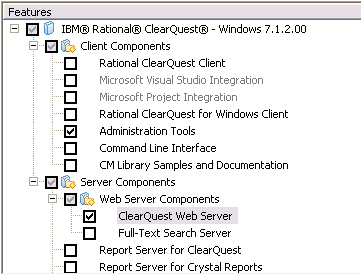
During the installation phase, select at least the ClearQuest Web Server and the Administration Tools options.
During the installation phase, select at least the ClearQuest Web Server and the Administration Tools options.
The port value can be kept to default. It is a good idea to specify the licenses server at this time (for example, 27000@my.license.server.full.name).
The ClearQuest installation comes with an embedded WebSphere server, so it is better if a WAS installation is not present, unless you plan to use it with ClearQuest.
After the ClearQuest installation completes (might need a restart), install DB2 (for example, 9.5.4).
The ClearQuest installation comes with an embedded WebSphere server, so it is better if a WAS installation is not present, unless you plan to use it with ClearQuest.
After the ClearQuest installation completes (might need a restart), install DB2 (for example, 9.5.4).
Preparing the databases
This installation creates 2 databases to be used by ClearQuest. One as a master repository (cqrepo) and one for the user data (cqdata).
To create the databases, open a DB2 CLP window and type in these commands:
To create the databases, open a DB2 CLP window and type in these commands:
db2 create db cqrepo pagesize 32 k
db2 create db cqdata pagesize 32 k
https://jazz.net/wiki/bin/view/Main/CQ-integrationEclipse + CC/CQ V7.1.2 플러그인 설치
Eclipse 버전을 다운로드 받아서 설치할 때 필요한 EMF, GEF, BIRT, TPTP 등 플러그인은 각각 아래 도움말을 통해 확인할 수 있습니다.
CQ client 플러그인 설치 도움말 : http://publib.boulder.ibm.com/infocenter/cqhelp/v7r1m2/index.jsp?topic=/com.ibm.rational.clearquest.install_upgrade.doc/topics/c_postinstall_eclipse.htm
(on Eclipse version 3.2.x, 3.3.x, 3.4.x, and 3.5.x)
CQ designer 플러그인 설치 도움말 : http://publib.boulder.ibm.com/infocenter/cqhelp/v7r1m2/index.jsp?topic=/com.ibm.rational.clearquest.install_upgrade.doc/topics/c_postinstall_designer.htm
CCRC 플러그인 설치 도움말 :
1. http:///ccrc/update (on Eclipse version 3.2.x, 3.3.x, 3.4, 3.5, and 3.5)
2.http://publib.boulder.ibm.com/infocenter/cchelp/v7r1m2/topic/com.ibm.rational.clearcase.cc_ms_install.doc/topics/c_inst_ccrc_eclipse.htm
CC SCM Adaptor 설치 도움말 : http://jazz.net/library/article/579
CC 플러그인 사용 도움말 : https://www-304.ibm.com/support/docview.wss?rs=2044&uid=swg21252464
CQ client 플러그인 설치 도움말 : http://publib.boulder.ibm.com/infocenter/cqhelp/v7r1m2/index.jsp?topic=/com.ibm.rational.clearquest.install_upgrade.doc/topics/c_postinstall_eclipse.htm
(on Eclipse version 3.2.x, 3.3.x, 3.4.x, and 3.5.x)
CQ designer 플러그인 설치 도움말 : http://publib.boulder.ibm.com/infocenter/cqhelp/v7r1m2/index.jsp?topic=/com.ibm.rational.clearquest.install_upgrade.doc/topics/c_postinstall_designer.htm
CCRC 플러그인 설치 도움말 :
1. http://
2.http://publib.boulder.ibm.com/infocenter/cchelp/v7r1m2/topic/com.ibm.rational.clearcase.cc_ms_install.doc/topics/c_inst_ccrc_eclipse.htm
CC SCM Adaptor 설치 도움말 : http://jazz.net/library/article/579
CC 플러그인 사용 도움말 : https://www-304.ibm.com/support/docview.wss?rs=2044&uid=swg21252464
CQ V7.1.2 + RTC 연계 설정
You can use Collaborative Lifecycle Management (CLM) integrations with products based on Jazz™ technology, including IBM? Rational Team Concert™ and IBM Rational? Quality Manager, to connect the work of all team members.
This technote describes how to configure Rational ClearQuest Web to use the Collaborative Lifecycle Management integrations.
Collaborative Lifecycle Management integrations provide a common approach to artifact linking, dashboards, security, and user interface frameworks. Cross-product links support traceability, web-like navigation, commenting, and status tracking across project repositories.
Collaborative Lifecycle Management integrations provide the following capabilities:
- Link to existing artifacts across repositories in integrated products; for example, ClearQuest? records are linked to work items and test cases.
- Hover over links to quickly check that status of associated work; for example testers can monitor the status of a defect that they reported to the development team.
- Add a viewlet to a dashboard to report query results from associated projects; for example, you can display requirements that have not been assigned test plans.
- Add comments to any artifact in an integrated repository.
This technote describes how to configure Rational ClearQuest Web to use the Collaborative Lifecycle Management integrations.
I. Applying the OSLCLinks package
I.A. About the OSLCLinks package
With the OSLCLinks package, you can integrate with other Rational products by creating and viewing links between artifacts in the ClearQuest client. For example, you can create links between ClearQuest records, Rational Team Concert work items, and Rational Quality Manager test execution records.
http://www-01.ibm.com/support/docview.wss?&rs=939&uid=swg21433074
http://www-01.ibm.com/support/docview.wss?&rs=939&uid=swg21433074
CQ V7.1.2 + RTC 연계 사용
This technote describes how to use Rational ClearQuest Web with the Collaborative Lifecycle Management integrations.
Note: Before using the integrations, you must follow the configuration instructions in Configuring ClearQuest Web for Collaborative Lifecycle Management integrations.
Associating records and Rational Team Concert work items from the ClearQuest Web client
Associate a ClearQuest record and Rational Team Concert work items while modifying an existing record or submitting a new one.
Procedure
1. Using the ClearQuest Web client, modify an existing record or submit a new one.
2. Click the Links tab.
3. To associate the record with an existing work item, click the arrow in the Add drop-down list, click Related Change Request, and then select the Rational Team Concert project area where the existing work item is located.
6. Click the work item link to open the associated work item in the Rational Team Concert Web client.
http://www-01.ibm.com/support/docview.wss?&rs=939&uid=swg21433076
Note: Before using the integrations, you must follow the configuration instructions in Configuring ClearQuest Web for Collaborative Lifecycle Management integrations.
Associating records and Rational Team Concert work items from the ClearQuest Web client
Associate a ClearQuest record and Rational Team Concert work items while modifying an existing record or submitting a new one.
Procedure
1. Using the ClearQuest Web client, modify an existing record or submit a new one.
2. Click the Links tab.
3. To associate the record with an existing work item, click the arrow in the Add drop-down list, click Related Change Request, and then select the Rational Team Concert project area where the existing work item is located.
- a. To find a work item using a keyword or the work item number, follow these steps:
- i. In the Work Item window, select Search by Keyword or Work Item Number.
ii. From the Type menu, select the work item type to narrow your search, or accept the default to show all work items that meet the search criteria that you specify in the next step.
iii. In the Work Item Number or Words Contained in the Text field, enter either a work item ID or text. The search begins as you start typing characters in this field.
- i. In the Work Item window, select Search by Query.
ii. In the Select a query from the tree below field, select a query to run.
- c. In the Matching Work items field, select the work item to associate with the record.
d. Click OK. The Work Item window closes and the work item link appears in the Links control under the Related Change Requestsheading.
- a. In the New Related Change Request window, select the type of work item to create and click OK.
b. Enter the required information in the work item template.
c. Click OK. The work item is created and associated with the ClearQuest record. The work item link appears in the LinksRelated Change Requests heading. control under the
6. Click the work item link to open the associated work item in the Rational Team Concert Web client.
http://www-01.ibm.com/support/docview.wss?&rs=939&uid=swg21433076
피드 구독하기:
글 (Atom)