OSLC 란?
OSLC는 소프트웨어 딜러버리 라이프싸이클 관련 리소스 및 인터페이스 표준화 관련 커뮤니티입니다. 이를 통해 ALM 도구 간의 통합을 지원합니다. 다른 한편으로 CQ 같은 하나의 도구의 리소스를 작업하기 위한 API로 사용할 수 있습니다.
더 자세한 정보는 http://open-services.net/.
REST 란?
REST는 아키텍처 스타일로서
- 리소스는 URI를 가집니다.
- 리소스는 다양한 표현을 가집니다.
- 리소스는 이러한 표현을 통해 변경할 수 있습니다.
- GET 메쏘드는 리소스를 가져옵니다.
- PUT 메쏘드는 리소스를 갱신합니다.
- POST 메쏘드는 새로운 리소스를 생성합니다.
- DELETE 메쏘드는 리소스를 삭제합니다.
CQ REST API 버전들
- CQ 7.1.0.0 웹에서 REST API를 처음 지원합니다.
- RTC 2.0과 CQ 7.1.1.0에서 OSLC-CM 1.0 REST API를 지원합니다.
- CQ 7.1.2.1에서 여기 소개된 OSLC-CM 2.0을 지원합니다.
OSLC 2.0 API를 사용할 때는 HTTP 요청 전 요청 헤더 OSLC-Core-Version의 값을 2.0으로 설정합니다.
OSLC-Core-Version: 2.0
이 헤더를 설정하지 않으면 하위 호환성을 위해 OSLC-CM 1.0 응답을 제공합니다.
- CQ OSLC 2.0의 XML 응답은 RDF/XML 표현입니다. Resource Representations 참고하세요.
- CQ OSLC 2.0의 RDF/XML와 JSON 응답은 표준 OSLC ChangeRequest 프로퍼티와 CQ 필드 값을 함께 제공합니다.
- PUT 요청시, oslc.properties 패리미터를 설정하지 않을 경우에는, 모든 필드 값을 제공해야 합니다. Working with Records: PUT 참고하세요.
- CQ OSLC 2.0에서는 각 레코드 유형별 쿼리 URL을 제공합니다.
- 네임스페이스 및 패러미터 이름은 OSLC-CM 2.0 Specification를 참고하세요.
리소스의 표현
CQ는 모든 리소스에 대한 RDF/XML (application/rdf+xml) 표현, JSON (application/json) 표현을 제공합니다. 쿼리인 경우, Atom (application/atom+xml) 표현도 지원하고, 레코드인 경우, HTML (text/html) 표현을 제공합니다. 콘텐츠 유형은 HTTP Accept 요청 헤더를 통해 표시합니다 (RFC 2616 참조). 예를 들면 RDF/XML 콘텐츠 유형을 요청할 경우, 아래 요청 헤더를 사용합니다. (Accept 헤더를 설정하지 않은 경우에 디폴트로 아래 값을 사용합니다.)
Accept: application/rdf+xml
아래처럼 하나 이상의 콘텐츠 유형을 요청할 수 있습니다.
Accept: text/html,application/atom+xml
아래처럼 rcm.contentType 패러미터를 이용해 콘텐츠를 요청할 수 있습니다. 이 경우에는 HTTP Accept 헤더에 설정 값을 무시합니다.
GET http://quagmire.rtp.raleigh.ibm.com/cqweb/oslc/?rcm.contentType=application/json
RDF/XML를 사용할 때는 사용 편의성 및 에러방지를 위해 RDF/XML 파싱시, Jena 같은 자바 라이브러리를 사용하길 권장합니다.
인증
CQ OSLC-CM REST API는 사용자 인증을 위해 Basic Access Authentication과 OAuth를 지원합니다. 리소스에 엑세스할 경우에는 인증에 대한 준비를 해야 합니다. 다만 Base URI에 GET 요청을 하고 스키마 저장소 목록을 가져올 경우에는 인증이 필요하지 않습니다. 인증이 필요할 경우에는 401 HTTP 상태 코드를 수반합니다.
Basic access authentication과 OAuth 중 어느 것을 사용할지?
대부분의 경우 Basic access authentication를 사용할 수 있습니다. 간단하며 셋업이 필요하지 않습니다. 다만 SSL을 사용하지 않는 경우 보안이 약합니다. 그리고 RFC2617에서 정의한바 비(非) ASCII 사용자 ID를 지원하지 않습니다.
OAuth는 관리자 셋업을 필요로 하지만 여러 장점이 있습니다. 사용자 ID와 암호가 필요하지 않는 까닭에 보다 안전합니다. 대신 CQ가 발행하는 엑세스 토큰으로 인증을 합니다. 엑세스 토큰은 서버 재시작 전까지 유효하며 한명의 사용자만 사용할 수 있습니다. 그렇더라도 SSL을 사용하는 것을 권장합니다.
Basic Access Authentication
Basic access authentication을 사용할때는 사용자 ID와 암호를 Base64 인코딩으로 HTTP 인증 요청 헤더에 명시합니다. SSL을 사용하지 않을 경우 보안에 약합니다.
거의 모든 브라우저에서 Basic access authentication을 지원합니다. CQ OSLC URI를 브라우저에서 탐색을 하게되면, 기존의 활성 세션이 없는 경우에는 사용자의 ID와 암호를 묻게 됩니다.
대부분의 HTTP 클라이언트 라이브러리 또한 Basic access authentication을 지원합니다. 아래 예는 Apache HTTP 클라이언트 사용하여 사용자 ID와 암호를 명시하는 경우입니다.
HttpClient http = new HttpClient();
Credentials credential
= new UsernamePasswordCredentials("user", "password");
http.getParams().setAuthenticationPreemptive(true);
http.getState().setCredentials(AuthScope.ANY, credential);
각 HTTP 클라이언트 라이브러리 문서를 참고하시기 바랍니다.
각 HTTP 클라이언트 라이브러리 문서를 참고하시기 바랍니다.
OAuth
시작하기 전에 먼저 OAuth 개념을 이해바랍니다. The Beginner's Guide to OAuth는 훌륭한 자료입니다.
OAuth 라이브러리
OAuth 인증을 사용할 때는 OAuth 라이브러리를 사용하여 요청에 사인을 합니다. 각각의 프로그래밍 언어별 오픈소스 라이브러리는 http://oauth.net/code/에서 찾을 수 있습니다.
OAuth 이용자 등록
OAuth 인증을 사용하기 위해서는 사용하는 애플리케이션을 OAuth 이용자로 등록해야 합니다. 우선 CQ 웹을 어드민으로 로그인을 하고, "Site Administration" 메뉴에서 "OAuth Consumer Management"를 선택합니다. 설정 대화 상자가 나타나면 아래 나와있는 OAuth 이용자 정보를 입력합니다.
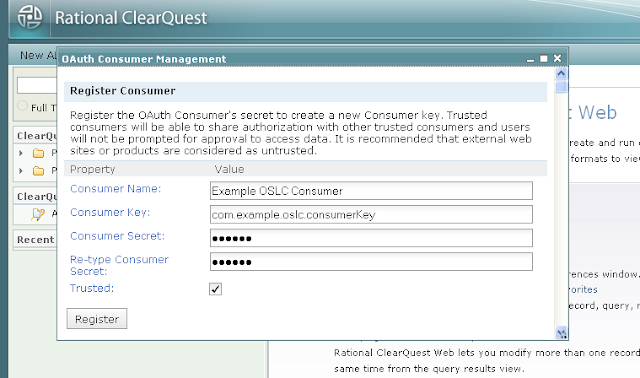
CQ는 RootServicesSpecAddendum2에 기술된 째즈의 동적 OAuth 이용자 등록 방법 또한 지원합니다. CQ의 루트 서비스 URI는 Base URI에 기술되어 있습니다.
OAuth 토큰 획득하기
OAuth 엑세스 토큰을 획득하는 절차는 아래와 같습니다.
OAuth 엑세스 토큰은 사용자 대신하여 요청을 할 수 있도록 해주며, CQ 서버가 재시작될때까지 유효합니다.
요청 사인하기
엑세스 토큰으로 요청을 사인할려면 OAuth 라이브러리가 필요합니다. CQ는, OAuth의 제공자로써, HMAC-SHA1 사인 메쏘드를 지원하며, Authorization 헤더, 쿼리 문자열의 일부 및 요청 바디 상의 OAuth 패러미터를 허용합니다. OAuth 1.0a: Parameter Transmission를 참고하세요.
세션 관리
CQ 세션은 클라이언트가 보호된 리소스를 접근할 때 체결되며 비활성 상태로 일정 기간이 지나면 만료됩니다. 만료는 HTTP 세션 타임아웃 또는 CQ 세션 타임아웃시 발생합니다. 일반적으로 세션이 체결될때 라이센스를 가져오며 세션이 만료될 때 라이센스가 릴리즈됩니다.
HTTP 클라이언트로 Base URI 아래 /session/ 컨텍스트에 DELETE 메쏘드를 호출함으로써 명시적으로 CQ 세션을 무효화할 수 있습니다.
시작하기 전에 먼저 OAuth 개념을 이해바랍니다. The Beginner's Guide to OAuth는 훌륭한 자료입니다.
OAuth 라이브러리
OAuth 인증을 사용할 때는 OAuth 라이브러리를 사용하여 요청에 사인을 합니다. 각각의 프로그래밍 언어별 오픈소스 라이브러리는 http://oauth.net/code/에서 찾을 수 있습니다.
OAuth 이용자 등록
OAuth 인증을 사용하기 위해서는 사용하는 애플리케이션을 OAuth 이용자로 등록해야 합니다. 우선 CQ 웹을 어드민으로 로그인을 하고, "Site Administration" 메뉴에서 "OAuth Consumer Management"를 선택합니다. 설정 대화 상자가 나타나면 아래 나와있는 OAuth 이용자 정보를 입력합니다.
| 프로퍼티 | 설명 |
|---|---|
| 이용자 이름 | 애플리케이션 이름, 사용자에게 표시됩니다. |
| 이용자 키 | 값을 지정하며 되며 유일해야 합니다. |
| 이용자 암호 | CQ와 애플리케이션간에 공유되는 암호입니다. CQ는 이 암호를 통해서 애플리케이션 요청을 검증합니다. 특정 값을 암호로 지정합니다. |
| 신뢰됨 | 선택을 할 경우, CQ는 신뢰하는 다른 애플리케이션과 인증을 공유할 수 있습니다. |
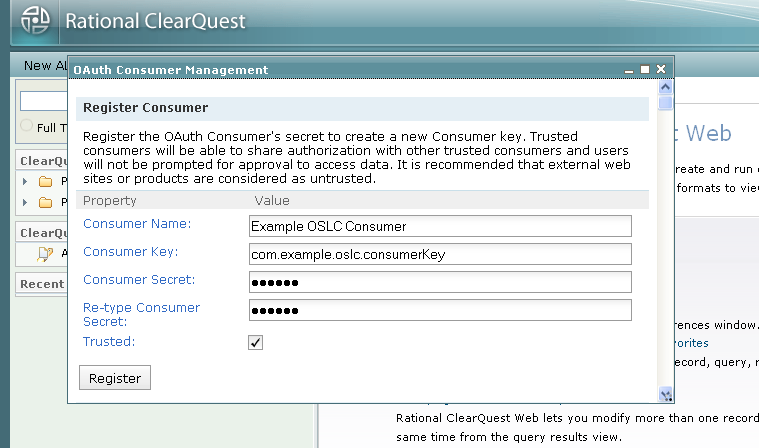
CQ는 RootServicesSpecAddendum2에 기술된 째즈의 동적 OAuth 이용자 등록 방법 또한 지원합니다. CQ의 루트 서비스 URI는 Base URI에 기술되어 있습니다.
OAuth 토큰 획득하기
OAuth 엑세스 토큰을 획득하는 절차는 아래와 같습니다.
- oslc:oauthRequestTokenURI로 OAuth 요청 토큰을 요청합니다.
- oslc:authorizationURI로 사용자 인증 처리를 리다이렉트합니다.
- oslc:oauthAccessTokenURI로 OAuth 요청 토큰을 OAuth 엑세스 토큰으로 교환합니다.
OAuth 엑세스 토큰은 사용자 대신하여 요청을 할 수 있도록 해주며, CQ 서버가 재시작될때까지 유효합니다.
요청 사인하기
엑세스 토큰으로 요청을 사인할려면 OAuth 라이브러리가 필요합니다. CQ는, OAuth의 제공자로써, HMAC-SHA1 사인 메쏘드를 지원하며, Authorization 헤더, 쿼리 문자열의 일부 및 요청 바디 상의 OAuth 패러미터를 허용합니다. OAuth 1.0a: Parameter Transmission를 참고하세요.
세션 관리
CQ 세션은 클라이언트가 보호된 리소스를 접근할 때 체결되며 비활성 상태로 일정 기간이 지나면 만료됩니다. 만료는 HTTP 세션 타임아웃 또는 CQ 세션 타임아웃시 발생합니다. 일반적으로 세션이 체결될때 라이센스를 가져오며 세션이 만료될 때 라이센스가 릴리즈됩니다.
HTTP 클라이언트로 Base URI 아래 /session/ 컨텍스트에 DELETE 메쏘드를 호출함으로써 명시적으로 CQ 세션을 무효화할 수 있습니다.
요청:
DELETE /cqweb/oslc/session/ HTTP/1.1
Host: quagmire.rtp.raleigh.ibm.com
OSLC-Core-Version: 2.0
응담:
HTTP/1.1 204 No Content
응담:
HTTP/1.1 204 No Content
Content-Length: 0
결과로 세션과 관련된 라이센스는 릴리스됩니다.
세션을 추적하기 위해서는 HTTP 클라이언트 사용시 쿠키를 사용 가능하도록 해야 합니다. Apache HTTP 클라이언트를 사용할 경우, http.protocol.single-cookie-header를 true로 설정할 수 있습니다.
HttpClient http = new HttpClient();
결과로 세션과 관련된 라이센스는 릴리스됩니다.
세션을 추적하기 위해서는 HTTP 클라이언트 사용시 쿠키를 사용 가능하도록 해야 합니다. Apache HTTP 클라이언트를 사용할 경우, http.protocol.single-cookie-header를 true로 설정할 수 있습니다.
HttpClient http = new HttpClient();
http.getParams().setParameter("http.protocol.single-cookie-header", true);
http.getParams().setCookiePolicy(CookiePolicy.BROWSER_COMPATIBILITY)
Base URI
OSLC-CM 2.0 엑세스를 위한 Base URI는 아래와 같습니다.
http:///cqweb/oslc/
통합를 위한 CQ 루트 서비스 URI는 아애와 같습니다.
http:///cqweb/oslc/repo//discovery
만약 데이터베이스 세트 이름에 비 ASCII 문자가 있다면 인코딩이 필요함을 주의하시기 바랍니다.
본 자료는 RootServicesSpec을 준수하며 째즈 제품과의 통합을 위해 많이 사용합니다.
Base URI
OSLC-CM 2.0 엑세스를 위한 Base URI는 아래와 같습니다.
http://
통합를 위한 CQ 루트 서비스 URI는 아애와 같습니다.
http://
만약 데이터베이스 세트 이름에 비 ASCII 문자가 있다면 인코딩이 필요함을 주의하시기 바랍니다.
본 자료는 RootServicesSpec을 준수하며 째즈 제품과의 통합을 위해 많이 사용합니다.
서비스 열람
서비스 열람은 OSLC 제공자가 제공하는 기능을 열람하도록 합니다. 그래서 OSLC 제공자와의 작업의 출발점이 됩니다. CQ는 OSLC Core 2.0 스펙을 따른 모델을 제공합니다. 먼저 Base URI에 GET 메쏘드를 호출하여 서비스 제공자 카탈로그를 획득합니다. 카탈로그와 다른 리소스와의 관계는 아래 그림을 참고하세요.

-
서비스 제공자 카탈로그
CQ가 제공하는 최상위 카탈로그는 서버에 정의된 데이터베이스 세트들입니다. 각 데이터베이스 세트는 각각의 사용자를 가지는 까닭에 개별적인 OAuth 구성정보를 가집니다. 각 데이터베이스 세트별로 개별 사용자 데이터베이스 카탈로그 위치를 가지고 있습니다.
아래는 CQ 서비스 제공자 카탈로그 리소스의 RDF/XML 표현 예로써 두개의 데이터베이스 세트: DOC, Links를 나타냅니다.
요청:
GET /cqweb/oslc/ HTTP/1.1
Host: quagmire.rtp.raleigh.ibm.com
OSLC-Core-Version: 2.0
Accept: application/rdf+xml
응답:
HTTP/1.1 200 OK
OSLC-Core-Version: 2.0
Transfer-Encoding: chunked
Content-Type: application/rdf+xml; charset=UTF-8

<?xml version="1.0" encoding="UTF-8"?>
<rdf:RDF xmlns="http://open-services.net/ns/core#" xmlns:dc="http://purl.org/dc/terms/" xmlns:rdf="http://www.w3.org/1999/02/22-rdf-syntax-ns#">
<ServiceProviderCatalog rdf:about="http://quagmire.rtp.raleigh.ibm.com/cqweb/oslc">
<dc:title>Repository</dc:title>
<dc:publisher>
<Publisher>
<dc:title>RCM/CQ OSLC CM Service Description Document</dc:title>
<label>RCM/CQ OSLC CM Service Description Document</label>
<dc:identifier>com.ibm.rational.cm.clearquest</dc:identifier>
<icon rdf:resource="http://quagmire.rtp.raleigh.ibm.com/cqweb/_rcm-resources/clearquest.ico"/>
</Publisher>
</dc:publisher>
<serviceProviderCatalog>
<ServiceProviderCatalog rdf:about="http://quagmire.rtp.raleigh.ibm.com/cqweb/oslc/repo/DOC">
<dc:title>DOC</dc:title>
<details rdf:resource="http://quagmire.rtp.raleigh.ibm.com/cqweb/"/>
<oauthConfiguration>
아래는 CQ 서비스 제공자 카탈로그 리소스의 JSON 표현 예로써 두개의 데이터베이스 세트: DOC, Links를 나타냅니다.
요청:
GET /cqweb/oslc/ HTTP/1.1
Host: quagmire.rtp.raleigh.ibm.com
OSLC-Core-Version: 2.0
Accept: application/json
응답: 생략
서비스 기술 문서
각각의 CQ 사용자 데이터베이스는 개별의 서비스 기술 문서를 가지고 있습니다. 이 서비스 기술 문서에는 새로운 레코드 생성과 쿼리를 위한 URL이 정의되어 있고 다른 웹 애플리케이션에서 사용할 수 있는 레코드 선택 및 생성에 필요한 대화상자에 대해 기술하고 있습니다. 각각의 레코드 유형별로 레코드 선택 및 생성 대화상자와 쿼리에 대한 서비스를 제공함을 유의하시기 바랍니다. 또한 디폴트로 제공하는 레코드 선택 대화상자는 레코드 유형을 선택할 수 있는 기능을 제공합니다.
아래는 DefectTracking 스키마의 SAMPL 사용자 데이터베이스가 제공하는 CQ 서비스 기술 문서 리소스에 대한 RDF/XML 표현의 예입니다.
요청:
GET /cqweb/oslc/repo/DOC/db/SAMPL/ HTTP/1.1
Host: quagmire.rtp.raleigh.ibm.com
OSLC-Core-Version: 2.0
Accept: application/rdf+xml
응답:
HTTP/1.1 200 OK
OSLC-Core-Version: 2.0
Transfer-Encoding: chunked
Content-Type: application/rdf+xml; charset=UTF-8

<?xml version="1.0" encoding="UTF-8"?>
<rdf:RDF xmlns="http://open-services.net/ns/core#" xmlns:dc="http://purl.org/dc/terms/" xmlns:cq="http://www.ibm.com/xmlns/prod/rational/clearquest/1.0/" xmlns:rdf="http://www.w3.org/1999/02/22-rdf-syntax-ns#">
<ServiceProvider rdf:about="http://quagmire.rtp.raleigh.ibm.com/cqweb/oslc/repo/DOC/db/SAMPL">
<dc:title>RCM/CQ OSLC CM Service Description Document</dc:title>
<dc:description>Rational Change Management/ClearQuest OSLC CM Services available for DOC/SAMPL.</dc:description>
<dc:publisher>
<Publisher>
<dc:title>IBM Rational ClearQuest</dc:title>
<label>IBM Rational ClearQuest</label>
<dc:identifier>com.ibm.rational.cm.clearquest</dc:identifier>
<icon rdf:resource="http://quagmire.rtp.raleigh.ibm.com/cqweb/_rcm-resources/clearquest.ico"/>
</Publisher>
</dc:publisher>
<details rdf:resource="http://quagmire.rtp.raleigh.ibm.com/cqweb/restapi/DOC/SAMPL?format=html"/>
<prefixDefinition>
<PrefixDefinition>
<prefix>oslc</prefix>
<prefixBase rdf:resource="http://open-services.net/ns/core#"/>
</PrefixDefinition>
</prefixDefinition>
<prefixDefinition>
<PrefixDefinition>
<prefix>oslc_cm</prefix>
<prefixBase rdf:resource="http://open-services.net/ns/cm#"/>
</PrefixDefinition>
</prefixDefinition>
<prefixDefinition>
<PrefixDefinition>
<prefix>dc</prefix>
<prefixBase rdf:resource="http://purl.org/dc/terms/"/>
</PrefixDefinition>
</prefixDefinition>
<prefixDefinition>
<PrefixDefinition>
<prefix>dcterms</prefix>
<prefixBase rdf:resource="http://purl.org/dc/terms/"/>
</PrefixDefinition>
</prefixDefinition>
<prefixDefinition>
<PrefixDefinition>
<prefix>rdf</prefix>
<prefixBase rdf:resource="http://www.w3.org/1999/02/22-rdf-syntax-ns#"/>
</PrefixDefinition>
</prefixDefinition>
<prefixDefinition>
<PrefixDefinition>
<prefix>rdfs</prefix>
<prefixBase rdf:resource="http://www.w3.org/2000/01/rdf-schema#"/>
</PrefixDefinition>
</prefixDefinition>
<prefixDefinition>
<PrefixDefinition>
<prefix>foaf</prefix>
<prefixBase rdf:resource="http://xmlns.com/foaf/0.1/"/>
</PrefixDefinition>
</prefixDefinition>
<prefixDefinition>
<PrefixDefinition>
<prefix>cq</prefix>
<prefixBase rdf:resource="http://www.ibm.com/xmlns/prod/rational/clearquest/1.0/"/>
</PrefixDefinition>
</prefixDefinition>
<prefixDefinition>
<PrefixDefinition>
<prefix>oslc_cmx</prefix>
<prefixBase rdf:resource="http://open-services.net/ns/cm-x#"/>
</PrefixDefinition>
</prefixDefinition>
<service>
<Service>
<domain rdf:resource="http://open-services.net/ns/cm#"/>
<creationFactory>
<CreationFactory>
<dc:title>Unattended location for the creation of ClearQuest Records</dc:title>
<label>Unattended location for the creation of ClearQuest Records</label>
<creation rdf:resource="http://quagmire.rtp.raleigh.ibm.com/cqweb/oslc/repo/DOC/db/SAMPL/record"/>
<resourceType rdf:resource="http://open-services.net/ns/cm#ChangeRequest"/>
<usage rdf:resource="http://open-services.net/ns/core#default"/>
<resourceShape rdf:resource="http://quagmire.rtp.raleigh.ibm.com/cqweb/oslc/repo/DOC/db/SAMPL/shape/16777224"/>
<resourceShape rdf:resource="http://quagmire.rtp.raleigh.ibm.com/cqweb/oslc/repo/DOC/db/SAMPL/shape/16777751"/>
<resourceShape rdf:resource="http://quagmire.rtp.raleigh.ibm.com/cqweb/oslc/repo/DOC/db/SAMPL/shape/16777220"/>
<resourceShape rdf:resource="http://quagmire.rtp.raleigh.ibm.com/cqweb/oslc/repo/DOC/db/SAMPL/shape/16777222"/>
<resourceShape rdf:resource="http://quagmire.rtp.raleigh.ibm.com/cqweb/oslc/repo/DOC/db/SAMPL/shape/16777219"/>
<resourceShape rdf:resource="http://quagmire.rtp.raleigh.ibm.com/cqweb/oslc/repo/DOC/db/SAMPL/shape/16777935"/>
<resourceShape rdf:resource="http://quagmire.rtp.raleigh.ibm.com/cqweb/oslc/repo/DOC/db/SAMPL/shape/16777221"/>
<resourceShape rdf:resource="http://quagmire.rtp.raleigh.ibm.com/cqweb/oslc/repo/DOC/db/SAMPL/shape/16777897"/>
<resourceShape rdf:resource="http://quagmire.rtp.raleigh.ibm.com/cqweb/oslc/repo/DOC/db/SAMPL/shape/16777223"/>
</CreationFactory>
</creationFactory>
<creationDialog>
<Dialog>
<dc:title>New Defect</dc:title>
<dc:description>Web dialog for creating new Defect records</dc:description>
<label>Defect</label>
<dialog rdf:resource="http://quagmire.rtp.raleigh.ibm.com/cqweb/oslc/repo/DOC/db/SAMPL/record-type/16777224/creationDialog?dc%3Atype=Defect"/>
<hintWidth>703px</hintWidth>
<hintHeight>510px</hintHeight>
<resourceType rdf:resource="http://open-services.net/ns/cm#ChangeRequest"/>
<usage rdf:resource="http://open-services.net/ns/core#default"/>
</Dialog>
</creationDialog>
<creationDialog>
<Dialog>
<dc:title>New Customer</dc:title>
<dc:description>Web dialog for creating new Customer records</dc:description>
<label>Customer</label>
<dialog rdf:resource="http://quagmire.rtp.raleigh.ibm.com/cqweb/oslc/repo/DOC/db/SAMPL/record-type/16777935/creationDialog?dc%3Atype=Customer"/>
<hintWidth>803px</hintWidth>
<hintHeight>588px</hintHeight>
<resourceType rdf:resource="http://open-services.net/ns/cm#ChangeRequest"/>
</Dialog>
</creationDialog>
<creationDialog>
<Dialog>
<dc:title>New Email_Rule</dc:title>
<dc:description>Web dialog for creating new Email_Rule records</dc:description>
<label>Email_Rule</label>
<dialog rdf:resource="http://quagmire.rtp.raleigh.ibm.com/cqweb/oslc/repo/DOC/db/SAMPL/record-type/16777751/creationDialog?dc%3Atype=Email_Rule"/>
<hintWidth>727px</hintWidth>
<hintHeight>471px</hintHeight>
<resourceType rdf:resource="http://open-services.net/ns/cm#ChangeRequest"/>
</Dialog>
</creationDialog>
<creationDialog>
<Dialog>
<dc:title>New Project</dc:title>
<dc:description>Web dialog for creating new Project records</dc:description>
<label>Project</label>
<dialog rdf:resource="http://quagmire.rtp.raleigh.ibm.com/cqweb/oslc/repo/DOC/db/SAMPL/record-type/16777897/creationDialog?dc%3Atype=Project"/>
<hintWidth>651px</hintWidth>
<hintHeight>294px</hintHeight>
<resourceType rdf:resource="http://open-services.net/ns/cm#ChangeRequest"/>
</Dialog>
</creationDialog>
<creationDialog>
<Dialog>
<dc:title>New groups</dc:title>
<dc:description>Web dialog for creating new groups records</dc:description>
<label>groups</label>
<dialog rdf:resource="http://quagmire.rtp.raleigh.ibm.com/cqweb/oslc/repo/DOC/db/SAMPL/record-type/16777222/creationDialog?dc%3Atype=groups"/>
<hintWidth>722px</hintWidth>
<hintHeight>194px</hintHeight>
<resourceType rdf:resource="http://open-services.net/ns/cm#ChangeRequest"/>
</Dialog>
</creationDialog>
<creationDialog>
<Dialog>
<dc:title>New ratl_replicas</dc:title>
<dc:description>Web dialog for creating new ratl_replicas records</dc:description>
<label>ratl_replicas</label>
<dialog rdf:resource="http://quagmire.rtp.raleigh.ibm.com/cqweb/oslc/repo/DOC/db/SAMPL/record-type/16777220/creationDialog?dc%3Atype=ratl_replicas"/>
<hintWidth>674px</hintWidth>
<hintHeight>342px</hintHeight>
<resourceType rdf:resource="http://open-services.net/ns/cm#ChangeRequest"/>
</Dialog>
</creationDialog>
<creationDialog>
<Dialog>
<dc:title>New users</dc:title>
<dc:description>Web dialog for creating new users records</dc:description>
<label>users</label>
<dialog rdf:resource="http://quagmire.rtp.raleigh.ibm.com/cqweb/oslc/repo/DOC/db/SAMPL/record-type/16777223/creationDialog?dc%3Atype=users"/>
<hintWidth>703px</hintWidth>
<hintHeight>376px</hintHeight>
<resourceType rdf:resource="http://open-services.net/ns/cm#ChangeRequest"/>
</Dialog>
</creationDialog>
<selectionDialog>
<Dialog>
<dc:title>Choose ClearQuest Record</dc:title>
<dc:description>Web dialog for finding and selecting ClearQuest Record records</dc:description>
<label>ClearQuest Record</label>
<dialog rdf:resource="http://quagmire.rtp.raleigh.ibm.com/cqweb/oslc/repo/DOC/db/SAMPL/record-type/16777224/selectionDialog?dc%3Atype=cq.repo.cq-rectype%3A16777224%40DOC%2FSAMPL&restrictType=false"/>
<hintWidth>640px</hintWidth>
<hintHeight>540px</hintHeight>
<resourceType rdf:resource="http://open-services.net/ns/cm#ChangeRequest"/>
<usage rdf:resource="http://open-services.net/ns/core#default"/>
</Dialog>
</selectionDialog>
<selectionDialog>
<Dialog>
<dc:title>Choose Defect</dc:title>
<dc:description>Web dialog for finding and selecting Defect records</dc:description>
<label>Defect</label>
<dialog rdf:resource="http://quagmire.rtp.raleigh.ibm.com/cqweb/oslc/repo/DOC/db/SAMPL/record-type/16777224/selectionDialog?dc%3Atype=cq.repo.cq-rectype%3A16777224%40DOC%2FSAMPL&restrictType=true"/>
<hintWidth>640px</hintWidth>
<hintHeight>540px</hintHeight>
<resourceType rdf:resource="http://open-services.net/ns/cm#ChangeRequest"/>
</Dialog>
</selectionDialog>
<selectionDialog>
<Dialog>
<dc:title>Choose Email_Rule</dc:title>
<dc:description>Web dialog for finding and selecting Email_Rule records</dc:description>
<label>Email_Rule</label>
<dialog rdf:resource="http://quagmire.rtp.raleigh.ibm.com/cqweb/oslc/repo/DOC/db/SAMPL/record-type/16777751/selectionDialog?dc%3Atype=cq.repo.cq-rectype%3A16777751%40DOC%2FSAMPL&restrictType=true"/>
<hintWidth>640px</hintWidth>
<hintHeight>540px</hintHeight>
<resourceType rdf:resource="http://open-services.net/ns/cm#ChangeRequest"/>
</Dialog>
</selectionDialog>
<selectionDialog>
<Dialog>
<dc:title>Choose ratl_replicas</dc:title>
<dc:description>Web dialog for finding and selecting ratl_replicas records</dc:description>
<label>ratl_replicas</label>
<dialog rdf:resource="http://quagmire.rtp.raleigh.ibm.com/cqweb/oslc/repo/DOC/db/SAMPL/record-type/16777220/selectionDialog?dc%3Atype=cq.repo.cq-rectype%3A16777220%40DOC%2FSAMPL&restrictType=true"/>
<hintWidth>640px</hintWidth>
<hintHeight>540px</hintHeight>
<resourceType rdf:resource="http://open-services.net/ns/cm#ChangeRequest"/>
</Dialog>
</selectionDialog>
<selectionDialog>
<Dialog>
<dc:title>Choose groups</dc:title>
<dc:description>Web dialog for finding and selecting groups records</dc:description>
<label>groups</label>
<dialog rdf:resource="http://quagmire.rtp.raleigh.ibm.com/cqweb/oslc/repo/DOC/db/SAMPL/record-type/16777222/selectionDialog?dc%3Atype=cq.repo.cq-rectype%3A16777222%40DOC%2FSAMPL&restrictType=true"/>
<hintWidth>640px</hintWidth>
<hintHeight>540px</hintHeight>
<resourceType rdf:resource="http://open-services.net/ns/cm#ChangeRequest"/>
</Dialog>
</selectionDialog>
<selectionDialog>
<Dialog>
<dc:title>Choose history</dc:title>
<dc:description>Web dialog for finding and selecting history records</dc:description>
<label>history</label>
<dialog rdf:resource="http://quagmire.rtp.raleigh.ibm.com/cqweb/oslc/repo/DOC/db/SAMPL/record-type/16777219/selectionDialog?dc%3Atype=cq.repo.cq-rectype%3A16777219%40DOC%2FSAMPL&restrictType=true"/>
<hintWidth>640px</hintWidth>
<hintHeight>540px</hintHeight>
<resourceType rdf:resource="http://open-services.net/ns/cm#ChangeRequest"/>
</Dialog>
</selectionDialog>
<selectionDialog>
<Dialog>
<dc:title>Choose Customer</dc:title>
<dc:description>Web dialog for finding and selecting Customer records</dc:description>
<label>Customer</label>
<dialog rdf:resource="http://quagmire.rtp.raleigh.ibm.com/cqweb/oslc/repo/DOC/db/SAMPL/record-type/16777935/selectionDialog?dc%3Atype=cq.repo.cq-rectype%3A16777935%40DOC%2FSAMPL&restrictType=true"/>
<hintWidth>640px</hintWidth>
<hintHeight>540px</hintHeight>
<resourceType rdf:resource="http://open-services.net/ns/cm#ChangeRequest"/>
</Dialog>
</selectionDialog>
<selectionDialog>
<Dialog>
<dc:title>Choose attachments</dc:title>
<dc:description>Web dialog for finding and selecting attachments records</dc:description>
<label>attachments</label>
<dialog rdf:resource="http://quagmire.rtp.raleigh.ibm.com/cqweb/oslc/repo/DOC/db/SAMPL/record-type/16777221/selectionDialog?dc%3Atype=cq.repo.cq-rectype%3A16777221%40DOC%2FSAMPL&restrictType=true"/>
<hintWidth>640px</hintWidth>
<hintHeight>540px</hintHeight>
<resourceType rdf:resource="http://open-services.net/ns/cm#ChangeRequest"/>
</Dialog>
</selectionDialog>
<selectionDialog>
<Dialog>
<dc:title>Choose Project</dc:title>
<dc:description>Web dialog for finding and selecting Project records</dc:description>
<label>Project</label>
<dialog rdf:resource="http://quagmire.rtp.raleigh.ibm.com/cqweb/oslc/repo/DOC/db/SAMPL/record-type/16777897/selectionDialog?dc%3Atype=cq.repo.cq-rectype%3A16777897%40DOC%2FSAMPL&restrictType=true"/>
<hintWidth>640px</hintWidth>
<hintHeight>540px</hintHeight>
<resourceType rdf:resource="http://open-services.net/ns/cm#ChangeRequest"/>
</Dialog>
</selectionDialog>
<selectionDialog>
<Dialog>
<dc:title>Choose users</dc:title>
<dc:description>Web dialog for finding and selecting users records</dc:description>
<label>users</label>
<dialog rdf:resource="http://quagmire.rtp.raleigh.ibm.com/cqweb/oslc/repo/DOC/db/SAMPL/record-type/16777223/selectionDialog?dc%3Atype=cq.repo.cq-rectype%3A16777223%40DOC%2FSAMPL&restrictType=true"/>
<hintWidth>640px</hintWidth>
<hintHeight>540px</hintHeight>
<resourceType rdf:resource="http://open-services.net/ns/cm#ChangeRequest"/>
</Dialog>
</selectionDialog>
<queryCapability>
<QueryCapability>
<resourceType rdf:resource="http://open-services.net/ns/cm#ChangeRequest"/>
<usage rdf:resource="http://open-services.net/ns/core#default"/>
<dc:title>Simple GET-based Record Query</dc:title>
<label>Defect</label>
<queryBase rdf:resource="http://quagmire.rtp.raleigh.ibm.com/cqweb/oslc/repo/DOC/db/SAMPL/simpleQuery/16777224"/>
<resourceShape rdf:resource="http://quagmire.rtp.raleigh.ibm.com/cqweb/oslc/repo/DOC/db/SAMPL/queryShape/16777224"/>
<cq:supportsOslcSearchTerms>false</cq:supportsOslcSearchTerms>
</QueryCapability>
</queryCapability>
<queryCapability>
<QueryCapability>
<resourceType rdf:resource="http://open-services.net/ns/cm#ChangeRequest"/>
<dc:title>Simple GET-based Record Query</dc:title>
<label>Email_Rule</label>
<queryBase rdf:resource="http://quagmire.rtp.raleigh.ibm.com/cqweb/oslc/repo/DOC/db/SAMPL/simpleQuery/16777751"/>
<resourceShape rdf:resource="http://quagmire.rtp.raleigh.ibm.com/cqweb/oslc/repo/DOC/db/SAMPL/queryShape/16777751"/>
<cq:supportsOslcSearchTerms>false</cq:supportsOslcSearchTerms>
</QueryCapability>
</queryCapability>
<queryCapability>
<QueryCapability>
<resourceType rdf:resource="http://open-services.net/ns/cm#ChangeRequest"/>
<dc:title>Simple GET-based Record Query</dc:title>
<label>ratl_replicas</label>
<queryBase rdf:resource="http://quagmire.rtp.raleigh.ibm.com/cqweb/oslc/repo/DOC/db/SAMPL/simpleQuery/16777220"/>
<resourceShape rdf:resource="http://quagmire.rtp.raleigh.ibm.com/cqweb/oslc/repo/DOC/db/SAMPL/queryShape/16777220"/>
<cq:supportsOslcSearchTerms>false</cq:supportsOslcSearchTerms>
</QueryCapability>
</queryCapability>
<queryCapability>
<QueryCapability>
<resourceType rdf:resource="http://open-services.net/ns/cm#ChangeRequest"/>
<dc:title>Simple GET-based Record Query</dc:title>
<label>groups</label>
<queryBase rdf:resource="http://quagmire.rtp.raleigh.ibm.com/cqweb/oslc/repo/DOC/db/SAMPL/simpleQuery/16777222"/>
<resourceShape rdf:resource="http://quagmire.rtp.raleigh.ibm.com/cqweb/oslc/repo/DOC/db/SAMPL/queryShape/16777222"/>
<cq:supportsOslcSearchTerms>false</cq:supportsOslcSearchTerms>
</QueryCapability>
</queryCapability>
<queryCapability>
<QueryCapability>
<resourceType rdf:resource="http://open-services.net/ns/cm#ChangeRequest"/>
<dc:title>Simple GET-based Record Query</dc:title>
<label>history</label>
<queryBase rdf:resource="http://quagmire.rtp.raleigh.ibm.com/cqweb/oslc/repo/DOC/db/SAMPL/simpleQuery/16777219"/>
<resourceShape rdf:resource="http://quagmire.rtp.raleigh.ibm.com/cqweb/oslc/repo/DOC/db/SAMPL/queryShape/16777219"/>
<cq:supportsOslcSearchTerms>false</cq:supportsOslcSearchTerms>
</QueryCapability>
</queryCapability>
<queryCapability>
<QueryCapability>
<resourceType rdf:resource="http://open-services.net/ns/cm#ChangeRequest"/>
<dc:title>Simple GET-based Record Query</dc:title>
<label>Customer</label>
<queryBase rdf:resource="http://quagmire.rtp.raleigh.ibm.com/cqweb/oslc/repo/DOC/db/SAMPL/simpleQuery/16777935"/>
<resourceShape rdf:resource="http://quagmire.rtp.raleigh.ibm.com/cqweb/oslc/repo/DOC/db/SAMPL/queryShape/16777935"/>
<cq:supportsOslcSearchTerms>false</cq:supportsOslcSearchTerms>
</QueryCapability>
</queryCapability>
<queryCapability>
<QueryCapability>
<resourceType rdf:resource="http://open-services.net/ns/cm#ChangeRequest"/>
<dc:title>Simple GET-based Record Query</dc:title>
<label>attachments</label>
<queryBase rdf:resource="http://quagmire.rtp.raleigh.ibm.com/cqweb/oslc/repo/DOC/db/SAMPL/simpleQuery/16777221"/>
<resourceShape rdf:resource="http://quagmire.rtp.raleigh.ibm.com/cqweb/oslc/repo/DOC/db/SAMPL/queryShape/16777221"/>
<cq:supportsOslcSearchTerms>false</cq:supportsOslcSearchTerms>
</QueryCapability>
</queryCapability>
<queryCapability>
<QueryCapability>
<resourceType rdf:resource="http://open-services.net/ns/cm#ChangeRequest"/>
<dc:title>Simple GET-based Record Query</dc:title>
<label>Project</label>
<queryBase rdf:resource="http://quagmire.rtp.raleigh.ibm.com/cqweb/oslc/repo/DOC/db/SAMPL/simpleQuery/16777897"/>
<resourceShape rdf:resource="http://quagmire.rtp.raleigh.ibm.com/cqweb/oslc/repo/DOC/db/SAMPL/queryShape/16777897"/>
<cq:supportsOslcSearchTerms>false</cq:supportsOslcSearchTerms>
</QueryCapability>
</queryCapability>
<queryCapability>
<QueryCapability>
<resourceType rdf:resource="http://open-services.net/ns/cm#ChangeRequest"/>
<dc:title>Simple GET-based Record Query</dc:title>
<label>users</label>
<queryBase rdf:resource="http://quagmire.rtp.raleigh.ibm.com/cqweb/oslc/repo/DOC/db/SAMPL/simpleQuery/16777223"/>
<resourceShape rdf:resource="http://quagmire.rtp.raleigh.ibm.com/cqweb/oslc/repo/DOC/db/SAMPL/queryShape/16777223"/>
<cq:supportsOslcSearchTerms>false</cq:supportsOslcSearchTerms>
</QueryCapability>
</queryCapability>
<cq:queryNavigatorDialog>
<Dialog>
<usage rdf:resource="http://open-services.net/ns/core#default"/>
<resourceType rdf:resource="http://open-services.net/ns/cm#ChangeRequest"/>
<dc:title>Choose Query - IBM Rational ClearQuest</dc:title>
<dc:description>Web dialog for choosing named queries</dc:description>
<dialog rdf:resource="http://quagmire.rtp.raleigh.ibm.com/cqweb/oslc/repo/DOC/db/SAMPL/queryNavigatorDialog"/>
<hintWidth>325px</hintWidth>
<hintHeight>375px</hintHeight>
</Dialog>
</cq:queryNavigatorDialog>
<cq:namedQuery>
<cq:NamedQuery>
<dc:title>Location for named queries and folders</dc:title>
<url xmlns="http://www.ibm.com/xmlns/prod/rational/clearquest/1.0/">http://quagmire.rtp.raleigh.ibm.com/cqweb/oslc/repo/DOC/db/SAMPL/query-folder</url>
</cq:NamedQuery>
</cq:namedQuery>
<cq:schema>
<cq:Schema>
<dc:title>URL to request record type definitions in XSD</dc:title>
<url xmlns="http://www.ibm.com/xmlns/prod/rational/clearquest/1.0/">http://quagmire.rtp.raleigh.ibm.com/cqweb/oslc/repo/DOC/db/SAMPL/record-type</url>
</cq:Schema>
</cq:schema>
<cq:localReplica>
<cq:Replica>
<dc:title><local></dc:title>
</cq:Replica>
</cq:localReplica>
<cq:defaultRecordType>
<cq:RecordType>
<dc:title>URL of the default record type</dc:title>
<url xmlns="http://www.ibm.com/xmlns/prod/rational/clearquest/1.0/">http://quagmire.rtp.raleigh.ibm.com/cqweb/oslc/repo/DOC/db/SAMPL/record-type/16777224</url>
</cq:RecordType>
</cq:defaultRecordType>
</Service>
</service>
<oslc_cmx:whoami xmlns:oslc_cmx="http://open-services.net/ns/cm-x#" rdf:resource="http://quagmire.rtp.raleigh.ibm.com/cqweb/oslc/repo/DOC/db/SAMPL/whoami"/>
</ServiceProvider>
</rdf:RDF>
리소스 형태
CQ는 레코드를 충분히 커스텀할 수 있는 기능을 제공합니다. 새로운 레코드 타입을 정의하고 각 레코드 타입에 들어갈 필드를 선택할 수 있습니다. 그렇다면 특정 CQ 사용자 데이터베이스에 있는 특정 레코드 타입에 정의된 필드는 어떻게 알 수 있을까요?
이를 돕기 위해 OSLC 리소스 형태를 제공합니다. 리소스 형태는 각 필드의 타입 뿐만 아니라 레코드에 정의된 필드들에 대한 정보를 알려줍니다. 또한 어떤 필드가 필수 요소이며 어떤 값이 유효한지 알수 있습니다. OSLC Core 2.0 스펙: 부록 A에 정의된 oslc:ResourceShape Resource 를 참고하시기 바랍니다.
레코드 타입 형태
레코드 타입에 대한 형태는 여러 곳에서 파악할 수 있습니다. 예를 들면,
- 레코드의 oslc:instanceShape 프로퍼키
- 서비스 기술 문서에 있는 레코드 생성 팩토리의 oslc:resourceShape 프로퍼티
- 쿼리 형태의 oslc:valueShape 프로퍼터
쿼리 결과 형태
CQ는 또 쿼리 결과 형태에 대한 정보를 제공합니다.
아래는 CQ 쿼리 결과 형태에 대한 JSON 표현의 예입니다.
요청:
GET /cqweb/oslc/repo/DOC/db/SAMPL/queryShape/16777224
Host: quagmire.rtp.raleigh.ibm.com
OSLC-Core-Version: 2.0
Accept: application/json
응답:HTTP/1.1 200 OK
OSLC-Core-Version: 2.0
Transfer-Encoding: chunked
Content-Type: application/json; charset=UTF-8
{
"prefixes":{
"oslc":"http:\/\/open-services.net\/ns\/core#",
"rdf":"http:\/\/www.w3.org\/1999\/02\/22-rdf-syntax-ns#",
"dcterms":"http:\/\/purl.org\/dc\/terms\/"
},
"rdf:type":[
{
"rdf:resource":"http:\/\/open-services.net\/ns\/core#ResourceShape"
}
],
"rdf:about":"http:\/\/quagmire.rtp.raleigh.ibm.com\/cqweb\/oslc\/repo\/DOC\/db\/SAMPL\/queryShape\/16777224",
"dcterms:title":"ClearQuest CM V2 Query Result",
"oslc:describes":"http:\/\/www.w3.org\/1999\/02\/22-rdf-syntax-ns#Description",
"oslc:property":[
{
"rdf:type":[
{
"rdf:resource":"http:\/\/open-services.net\/ns\/core#Property"
}
],
"oslc:name":"member",
"oslc:propertyDefinition":{
"rdf:resource":"http:\/\/www.w3.org\/2000\/01\/rdf-schema#member"
},
"oslc:valueType":"http:\/\/open-services.net\/ns\/core#AnyResource",
"oslc:occurs":{
"rdf:resource":"http:\/\/open-services.net\/ns\/core#Zero-or-many"
},
"oslc:range":{
"rdf:resource":"http:\/\/open-services.net\/ns\/cm#ChangeRequest"
},
"oslc:valueShape":{
"rdf:resource":"http:\/\/quagmire.rtp.raleigh.ibm.com\/cqweb\/oslc\/repo\/DOC\/db\/SAMPL\/shape\/16777224"
},
"oslc:representation":{
"rdf:resource":"http:\/\/open-services.net\/ns\/core#Inline"
},
"oslc:readOnly":"true",
"oslc:isMemberProperty":"true"
}
]
}
OSLC-CM 2.0 ChangeRequest 리소스에 대한 지원
OSLC 2.0 Change Management 스펙은 ChangeRequest 리소스에 대해 정의하고 있습니다. 이 리소스는 OSLC 제공자가 공통으로 갖는 프로퍼티들을 갖고 있습니다. CQ 또한 이러한 프로퍼티 대부분을 지원합니다.
모든 레코드에 공통인 표준 프로퍼티들
아래 표준 ChangeRequest 프로퍼티들은 모든 유형의 레코드에서 제공합니다.
- dcterms:title
- rdf:type
- dcterms:type
- dcterms:identifier
- oslc_cm:shortTitle
- oslc:instanceShape
추가로 상태를 갖는 레코드에는 다음 프로퍼티를 제공합니다.
- oslc_cm:status
OSLCLinks 패키지에서 제공하는 표준 프로퍼티들
레코드 타입에 OSLCLinks 패키지를 적용한 경우 추가적으로 제공하는 OSLC ChangeRequest 프로퍼티들이 있습니다.
OSLCLinks 1.0
OSLCLinks 1.0 패키지는 여느 레코드와의 링크를 허용합니다. OSLC-CM 2.0에서 정의한 모든 링크 타입이 지원됩니다.
- oslc_cm:relatedChangeRequest
- oslc_cm:affectsPlanItem
- oslc_cm:affectedByDefect
- oslc_cm:tracksRequirement
- oslc_cm:implementsRequirement
- oslc_cm:affectsRequirement
- oslc_cm:testedByTestCase
- oslc_cm:affectsTestResult
- oslc_cm:blocksTestExecutionRecord
- oslc_cm:relatedTestExecutionRecord
- oslc_cm:relatedTestCase
- oslc_cm:relatedTestPlan
- oslc_cm:relatedTestScript
- oslc_cm:tracksChangeSet
OSLCLinks 1.1
OSLCLinks 1.1 패키지는 상태 값 프로퍼티를 제공합니다.
- oslc_cm:closed
- oslc_cm:inprogress
- oslc_cm:fixed
- oslc_cm:approved
- oslc_cm:reviewed
- oslc_cm:verified
스키마에서 정의된 워크플로우에 맞게 상태 값을 설정하기 위해서는 훅(Hook)이 필요합니다. OSLCLinks 패키지 관련 문서를 참고하세요.
그 밖의 표준 프로퍼티들
ALM 스키마를 사용한 경우 OOTB로 oslc:description, dcterms:creator, dcterms:contributor 등의 OSLC ChangeRequest 프로퍼티들을 제공합니다. 레코드에서 사용할 수 있는 OSLC 프로퍼티들을 파악하기 위해서는 레코드에 대한 oslc:instanceShape를 요청해서 알아볼 수 있습니다.
-


