레이블이 plainJavaLib인 게시물을 표시합니다. 모든 게시물 표시

2011년 12월 30일 금요일

Java HTTP 라이브러리 (OSLC REST 프로그램시)

Java
  • HttpURLConnection
Apache HTTP Client
참고 JFS SDK (https://jazz.net/wiki/bin/view/Main/ServerSDKOverview)
  • REST Framework: The JFS SDK provides a REST framework that can be used by applications to structure their code as a set of REST handlers (also called services). This framework is based on Apache's HTTP Component library. A key characteristic of this framework is that the REST handlers work with the HttpRequest and HttpResponse classes provided by the Apache's HTTP Component library, instead of the HttpServletRequest and HttpServletResponse classes provided by J2EE. This approach allows us to create a framework that is isolated from application servers-specific behavior (See the ServerSDKQnA for more details).
-
참고 bulk operations


-

StaleDataException

Exception -> Status Code(https://jazz.net/wiki/bin/view/Main/JFSStorageAPI)
  • ItemNotFoundException -> 404 Not found 
  • IllegalArgumentException -> 400 Bad Request 
  • StaleDataException -> 409 Conflict 
  • TeamRepositoryException -> 500 Internal Server Error

Every time an item is saved, a new state is created. When you save an item, the newest state must be used, otherwise you get a StaleDataException.

When you save an item more than once, you will need to make sure that you always have the latest state by:

  • either use the item returned by the save call
  • fetch the item from the repository again


StaleDataException is being caused because the work item you are referencing has already been updated from a previous change and you are still referencing the old work item.

So let's say you are updating multiple attributes but each independently. The pseudo-code would be something like this ...

[begin of pseudo-code]

get work item handle
get working copy
edit attribute 1
save working copy

get fresh copy of work item
get working copy
edit attribute 2
save working copy

get fresh copy of work item
...

[end of pseudo-code]

// get fresh copy of work item
workItem = workItemServer.findWorkItemById(workItem.getId(), IWorkItem.FULL_PROFILE, monitor);

2011년 12월 29일 목요일

RTC plain Java Client Lib를 이용한 서블릿 WAS7 배포시 유의점


1) 웹프로젝트 외에 EAR 프로젝트를 만듭니다.

2) 웹프로젝트에 톰캣라이브러리 빼고 WAS라이브러리를 추가합니다.

3) 웹프로젝트 WEB-INF/lib에서 RTC plain lib 중 두개 javax.*.jar는 제외 (WAS라이브러리로 대체됨)

4) EAR를 export하여 만들고 WAS에 deploy

5) WAS에서 EAR를 실행하기전 클래스로더를 설정


6) EAR를 실행


2011년 12월 22일 목요일

Client API - 라이센스 부여


repo.login(monitor);

//static String userID = "jyyie";
IContributorManager contributorManager = repo.contributorManager();
IContributor contributor = contributorManager.fetchContributorByUserId(userID, monitor);

// Print licenses types in repository
ILicenseAdminService licenseService =
(ILicenseAdminService)((TeamRepository)repo).getServiceInterface(ILicenseAdminService.class);
IContributorLicenseType licenseTypes[] = licenseService.getLicenseTypes();
System.out.println("");
for(IContributorLicenseType licenseType : licenseTypes){
String id = licenseType.getId();
System.out.println(id);
}

/*
com.ibm.team.rrc.reviewer
com.ibm.team.rrc.author
com.ibm.team.rrc.system
com.ibm.team.rtc.stakeholder
com.ibm.team.rtc.contributor
com.ibm.team.rtc.developer
com.ibm.rtc.developer-iep
com.ibm.team.rtc.buildsystem
com.ibm.team.rtc.cc-connector
com.ibm.team.rtc.cq-connector
com.ibm.rqm.viewer
com.ibm.rqm.tester
com.ibm.rqm.functional
com.ibm.team.lpa.system
com.ibm.team.clm.datacollector
com.ibm.team.rrc.author.floating

com.ibm.team.rtc.contributor.floating
com.ibm.team.rtc.developer.floating
com.ibm.rqm.tester.floating
com.ibm.clm.professional.floating

*/

2011년 12월 18일 일요일

RTC plain Java Client LIb의 서블릿에 설정

1. 서블릿의 WEB-INF/lib에 plainJavaLib들을 추가합니다.
2. 다음은 TeamPlatform을 통해서 ...


RTC plain Java Client Lib 개발 환경 설정

https://jazz.net/wiki/bin/view/Main/RTCSDK20_DevelopmentEnvironmentSetup

Note: Some of the download archives (particularly the source and JUnit archives) have path lengths longer than 250 characters and cause trouble for some extractor tools on windows. One zip extractor tool that works is 7Zip.


Plain Java Development

Step 1: Downloads

Client for Eclipse IDE, Server 및 Plain Java Client Libraries 파일을 "All Downloads" 페이지에서 다운로드를 받습니다.

Step 2: Installation

  • $INSTALLDIR에 서버 압축을 풉니다
  • $INSTALLDIR/jazz/client/plainjava에 plain java client 압축을 풉니다.

Step 3: Hello World Client

The plain java client library includes a set of snippets which show how to use the basics like creating a work item, creating streams and delivering changes, and creating team and project areas. If you don't want to use the command line as shown in the README.TXT, you can use Rational Team Concert itself to run the snippets as follows:

  • Create a new Java project and in the wizard create the project from an existing directory. Select the directory into which you unzipped the Jazz Plain Java Client Libraries.
  • On the second page of the wizard, select the Add Jars... button and add all the jars from the client library install to the classpath of this new Java project.

The new project will have the snippets package and the snippets will compile against the jars. You can then start the server and follow the instructions in the snippets/README.TXT file for adding the test user and running the snippets.
This will provide an easy setup, but it's hard to browse the source code since the source is packaged as plug-in source packages. As a result, there is an alternate setup which will allow browsing the source directly for the plain java client. For regular Eclipse plug-in development, the source packaging is 100% compatible.

2011년 12월 2일 금요일

작업항목 Working Copy

https://jazz.net/wiki/bin/view/Main/WorkItemWebItemProxyDesign


Work Item web UI uses a working copy to:
  • manage synchronization among views
  • handle special cases for attributes
  • handle client communication
The goals of the working copy design are:
  • Make sure all versions of a work item or attribute shown are the same
  • Maintain the "isChanged" state across views
  • Encapsulate work item specific changes to the working copy and out of the views
  • Enable enhancements of work item management (e.g., polling and merging) without changing the view code
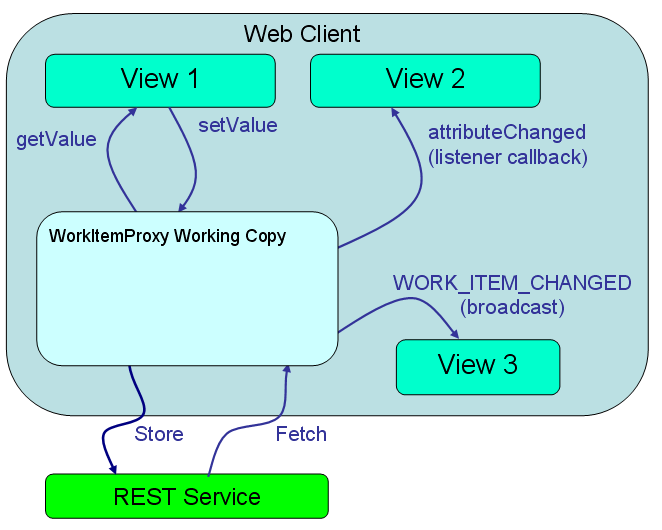
clientcaching.png
The working copy lets multiple views show the same work item data such that all views are kept in sync. The basic flow is:
  1. View 1 creates a working copy as in instance of WorkItemProxy using the WorkItemProxyFactory which uses the Cache.
  2. View 1 fetches the latest version of the work item via WorkItemProxy.
  3. View 2 gets a copy of the working copy from the WorkItemProxyFactory. View 2 registers attribute listeners to get called back when the attributes change.
  4. View 3 gets registers as a subscriber to WORK_ITEM_CHANGED broadcasts.
  5. View 1 changes an attribute using setValue. View 2 is notified of that that the attribute has changed. View 3 is notified the the WORK_ITEM_CHANGED.

2011년 11월 20일 일요일

Client API - 특정 상태를 이용한 쿼리


repo.login(monitor);

IProcessClientService processClient = (IProcessClientService)repo.getClientLibrary(IProcessClientService.class);
URI uri = URI.create(prjAreaName.replaceAll(" ", "%20"));
IProjectArea prjArea = (IProjectArea)processClient.findProcessArea(uri, null, null);
IProjectAreaHandle prjAreaHandle = (IProjectAreaHandle)prjArea.getItemHandle();

IContributorManager contributorManager = repo.contributorManager();
IContributor kdyoung = contributorManager.fetchContributorByUserId(userId, null);
System.out.println(kdyoung.getEmailAddress());

IQueryClient queryClient = (IQueryClient) repo.getClientLibrary(IQueryClient.class);
IAuditableClient auditableClient = (IAuditableClient) repo.getClientLibrary(IAuditableClient.class);
IQueryableAttributeFactory attFactory = QueryableAttributes.getFactory(IWorkItem.ITEM_TYPE);

Client API - 상태그룹 쿼리


repo.login(monitor);

IProcessClientService processClient = (IProcessClientService)repo.getClientLibrary(IProcessClientService.class);
URI uri = URI.create(prjAreaName.replaceAll(" ", "%20"));
IProjectArea prjArea = (IProjectArea)processClient.findProcessArea(uri, null, null);
IProjectAreaHandle prjAreaHandle = (IProjectAreaHandle)prjArea.getItemHandle();

IContributorManager contributorManager = repo.contributorManager();
IContributor kdyoung = contributorManager.fetchContributorByUserId(userId, null);
System.out.println(kdyoung.getEmailAddress());

IQueryClient queryClient = (IQueryClient) repo.getClientLibrary(IQueryClient.class);
IAuditableClient auditableClient = (IAuditableClient) repo.getClientLibrary(IAuditableClient.class);
IQueryableAttributeFactory attFactory = QueryableAttributes.getFactory(IWorkItem.ITEM_TYPE);

Client API - 특정 프로젝트 영역에 멤버와 역할을 추가


repo.login(monitor);

IProcessClientService processClient = (IProcessClientService)repo.getClientLibrary(IProcessClientService.class);
URI uri = URI.create(prjAreaName.replaceAll(" ", "%20"));
IProjectArea prjArea = (IProjectArea)processClient.findProcessArea(uri, null, null);

IProcessItemService processService = (IProcessItemService)repo.getClientLibrary(IProcessItemService.class);
IClientProcess process = processService.getClientProcess(prjArea, monitor);
IRole[] availableRoles = process.getRoles(prjArea, monitor);

Client API - 작업항목 ID 검색 및 열거형 값 수정


repo.login(monitor);

//static String prjAreaName = "My Project1";
IProcessClientService processClient = (IProcessClientService)repo.getClientLibrary(IProcessClientService.class);
URI uri = URI.create(prjAreaName.replaceAll(" ", "%20"));
IProjectArea prjArea = (IProjectArea)processClient.findProcessArea(uri, null, null);
IProjectAreaHandle prjAreaHandle = (IProjectAreaHandle)prjArea.getItemHandle();

//static int workItemNumber = 15;
IWorkItemClient workItemClient = (IWorkItemClient) repo.getClientLibrary(IWorkItemClient.class);
IWorkItemWorkingCopyManager copyManager = workItemClient.getWorkItemWorkingCopyManager();
IWorkItemHandle workItemHandle = workItemClient.findWorkItemById(workItemNumber, IWorkItem.FULL_PROFILE, monitor);
copyManager.connect(workItemHandle, IWorkItem.FULL_PROFILE, monitor);
WorkItemWorkingCopy workItemCopy = copyManager.getWorkingCopy(workItemHandle);
IWorkItem workItem = workItemCopy.getWorkItem();

Client API - 작업항목 ID 검색 및 열거형 값 출력


repo.login(monitor);

//static String prjAreaName = "My Project1";
IProcessClientService processClient = (IProcessClientService)repo.getClientLibrary(IProcessClientService.class);
URI uri = URI.create(prjAreaName.replaceAll(" ", "%20"));
IProjectArea prjArea = (IProjectArea)processClient.findProcessArea(uri, null, null);
IProjectAreaHandle prjAreaHandle = (IProjectAreaHandle)prjArea.getItemHandle();

//static int workItemNumber = 15;
IWorkItemClient workItemClient = (IWorkItemClient) repo.getClientLibrary(IWorkItemClient.class);
IWorkItemWorkingCopyManager copyManager = workItemClient.getWorkItemWorkingCopyManager();
IWorkItemHandle workItemHandle = workItemClient.findWorkItemById(workItemNumber, IWorkItem.FULL_PROFILE, monitor);
copyManager.connect(workItemHandle, IWorkItem.FULL_PROFILE, monitor);
WorkItemWorkingCopy workItemCopy = copyManager.getWorkingCopy(workItemHandle);
IWorkItem workItem = workItemCopy.getWorkItem();

Client API - 특정 프로젝트 영역의 속성 목록 및 특정 열거형 리터럴 목록 출력


repo.login(monitor);

//static String prjAreaName = "My Project1";
IProcessClientService processClient = (IProcessClientService)repo.getClientLibrary(IProcessClientService.class);
URI uri = URI.create(prjAreaName.replaceAll(" ", "%20"));
IProjectArea prjArea = (IProjectArea)processClient.findProcessArea(uri, null, null);
IProjectAreaHandle prjAreaHandle = (IProjectAreaHandle)prjArea.getItemHandle();

IWorkItemClient workItemClient = (IWorkItemClient) repo.getClientLibrary(IWorkItemClient.class);
List<IAttribute> listAttributes = workItemClient.findAttributes(prjAreaHandle, monitor);
System.out.println("--------");
System.out.println("속성 목록");
System.out.println("--------");
for (IAttribute attribute : listAttributes) {
   System.out.println("속성 Name: " + attribute.getDisplayName());
   System.out.println("속성 ID: " + attribute.getIdentifier());
}

Client API - 작업항목 첨부문서를 디스크에 저장


repo.login(monitor);

IWorkItemClient workItemClient = (IWorkItemClient) repo.getClientLibrary(IWorkItemClient.class);
IWorkItemWorkingCopyManager copyManager = workItemClient.getWorkItemWorkingCopyManager();
IWorkItemHandle workItemHandle = workItemClient.findWorkItemById(
workItemNumber, IWorkItem.FULL_PROFILE, monitor);
copyManager.connect(workItemHandle, IWorkItem.FULL_PROFILE, monitor);
WorkItemWorkingCopy workItemCopy = copyManager.getWorkingCopy(workItemHandle);
// IWorkItem workItem = workItemCopy.getWorkItem();
IWorkItemReferences references = workItemCopy.getReferences();

Client API - 작업항목에 문서첨부


repo.login(monitor);

IWorkItemClient workItemClient = (IWorkItemClient) repo.getClientLibrary(IWorkItemClient.class);
IWorkItemWorkingCopyManager copyManager = workItemClient.getWorkItemWorkingCopyManager();
IWorkItemHandle workItemHandle = workItemClient.findWorkItemById(workItemNumber, IWorkItem.FULL_PROFILE, monitor);
copyManager.connect(workItemHandle, IWorkItem.FULL_PROFILE, monitor);
WorkItemWorkingCopy workItemCopy = copyManager.getWorkingCopy(workItemHandle);
//IWorkItem workItem = workItemCopy.getWorkItem();

File file = new File("C:/FileToAttache.txt");
IReference fileRef = IReferenceFactory.INSTANCE.createReferenceFromURI(file.toURI(), file.getName());
IWorkItemReferences references = workItemCopy.getReferences();
references.add(WorkItemEndPoints.ATTACHMENT, fileRef);
IDetailedStatus saveStatus = workItemCopy.save(monitor);
System.out.println("Save Status : " + (saveStatus.isOK() ? "Success" : "Fail"));

TeamPlatform.shutdown();

Client API - 작업항목 ID 검색 및 삭제


repo.login(monitor);

IWorkItemClient workItemClient = (IWorkItemClient) repo.getClientLibrary(IWorkItemClient.class);
IWorkItemWorkingCopyManager copyManager = workItemClient.getWorkItemWorkingCopyManager();
IWorkItemHandle workItemHandle = workItemClient.findWorkItemById(workItemNumber, IWorkItem.FULL_PROFILE, monitor);
copyManager.connect(workItemHandle, IWorkItem.FULL_PROFILE, monitor);
WorkItemWorkingCopy workItemCopy = copyManager.getWorkingCopy(workItemHandle);
IStatus deleteStatus = workItemCopy.delete(monitor);
System.out.println("Delete Status : " + (deleteStatus.isOK() ? "Success" : "Fail"));

TeamPlatform.shutdown();

Client API - 특정 유형의 작업항목 생성


repo.login(monitor);

IProcessClientService processClient = (IProcessClientService)repo.getClientLibrary(IProcessClientService.class);
URI uri = URI.create(prjAreaName.replaceAll(" ", "%20"));
IProjectArea prjArea = (IProjectArea)processClient.findProcessArea(uri, null, null);
IProjectAreaHandle prjAreaHandle = (IProjectAreaHandle)prjArea.getItemHandle();

IWorkItemClient workItemClient = (IWorkItemClient) repo.getClientLibrary(IWorkItemClient.class);
IWorkItemWorkingCopyManager copyManager = workItemClient.getWorkItemWorkingCopyManager();
IWorkItemType workItemType = workItemClient.findWorkItemType(prjAreaHandle, "Issue", null);
IWorkItemHandle workItemHandle = copyManager.connectNew(workItemType, monitor);
WorkItemWorkingCopy workItemCopy = copyManager.getWorkingCopy(workItemHandle);
IWorkItem workItem = workItemCopy.getWorkItem();
workItem.setHTMLSummary(XMLString.createFromPlainText("Test - Adding work item"));
IDetailedStatus saveStatus = workItemCopy.save(monitor);
System.out.println("Save Status : " + (saveStatus.isOK() ? "Success" : "Fail"));

TeamPlatform.shutdown();

Client API - 작업항목 ID 검색 및 수정


repo.login(monitor);

IWorkItemClient workItemClient = (IWorkItemClient) repo.getClientLibrary(IWorkItemClient.class);
IWorkItemWorkingCopyManager copyManager = workItemClient.getWorkItemWorkingCopyManager();
IWorkItemHandle workItemHandle = workItemClient.findWorkItemById(workItemNumber, IWorkItem.FULL_PROFILE, monitor);
copyManager.connect(workItemHandle, IWorkItem.FULL_PROFILE, monitor);
WorkItemWorkingCopy workItemCopy = copyManager.getWorkingCopy(workItemHandle);
IWorkItem workItem = workItemCopy.getWorkItem();
workItem.setHTMLSummary(XMLString.createFromPlainText("Test - Editing work item"));
IDetailedStatus saveStatus = workItemCopy.save(monitor);
System.out.println("Save Status : " + (saveStatus.isOK() ? "Success" : "Fail"));

TeamPlatform.shutdown();

Client API - 쿼리 결과를 리스트로 만들기


IQueryResult<IResolvedResult<IWorkItem>> queryResult = queryClient.getResolvedExpressionResults(prjAreaHandle, term, IWorkItem.FULL_PROFILE);

List<IWorkItem> matchingWorkItems = new ArrayList<IWorkItem>(queryResult.getResultSize(monitor).getTotalAvailable());
while (queryResult.hasNext(monitor)) {
matchingWorkItems.add(queryResult.next(monitor).getItem());
}

for (IWorkItem workItem : matchingWorkItems) {
System.out.println(workItem.getId() + " - " + workItem.getHTMLSummary().getPlainText());
}

TeamPlatform.shutdown();

쿼리에 관련된 보다 자세한 정보는 https://jazz.net/wiki/bin/view/Main/QueryDevGuide

Client API - 특정 프로젝트 영역내 특정 작업항목 유형 쿼리


IProjectAreaHandle prjAreaHandle = (IProjectAreaHandle)prjArea.getItemHandle(); 

IQueryClient queryClient = (IQueryClient) repo.getClientLibrary(IQueryClient.class);
IAuditableClient auditableClient = (IAuditableClient) repo.getClientLibrary(IAuditableClient.class);
IQueryableAttributeFactory attFactory = QueryableAttributes.getFactory(IWorkItem.ITEM_TYPE);

IQueryableAttribute typeAttribute = attFactory.findAttribute(prjAreaHandle, IWorkItem.TYPE_PROPERTY, auditableClient, null);
Expression expression = new AttributeExpression(typeAttribute, AttributeOperation.EQUALS, workItemTypeName);

IQueryableAttribute projectAreaAttribute = attFactory.findAttribute(prjAreaHandle, IWorkItem.PROJECT_AREA_PROPERTY, auditableClient, null);
AttributeExpression projectAreaExpression = new AttributeExpression(projectAreaAttribute, AttributeOperation.EQUALS, prjAreaHandle);

Term term = new Term(Operator.AND);
term.add(projectAreaExpression);
term.add(expression);

IQueryResult<IResolvedResult<IWorkItem>> queryResult = queryClient.getResolvedExpressionResults(prjAreaHandle, term, IWorkItem.FULL_PROFILE);

System.out.println("# of Query Results: " + queryResult.getResultSize(monitor).getTotal());

TeamPlatform.shutdown();


쿼리에 관련된 보다 자세한 정보는 https://jazz.net/wiki/bin/view/Main/QueryDevGuide